




When you’re searching for the best gaming mice for under $400, the most expensive option on the shelf usually isn’t the right answer — the right answer is the mouse that fits your hand, your grip, and the way you actually play.
We know that sounds like a strange way to start a buying guide. Most articles in this space lead with a spec sheet. We’re leading with the truth: at this budget, sensor performance stopped being the bottleneck years ago. What separates a mouse you love from a mouse you regret is shape, weight distribution, and how it feels three hours into a ranked session.
A $400 budget puts almost the entire premium gaming mouse market within reach, including top-tier wireless flagships from Logitech and Razer, niche enthusiast picks from brands like Endgame Gear and WLMouse, and even room left over for a backup mouse. That’s a lot of options, and a lot of ways to spend money on the wrong one.
Here’s what we mean. A flagship sensor that tracks at 750+ IPS and 8,000Hz polling sounds impressive, but if the shape doesn’t match your grip, none of that matters — you’ll fatigue faster, lose micro-adjustment precision, and probably blame the mouse for mistakes that were really about fit. We’ve watched experienced players switch mice expecting an aim upgrade and instead just get a different set of compromises.
So instead of ranking mice purely by spec sheets, we tested them the way you’ll actually use them: gripping, aiming, flicking, tracking, and carrying them around a desk for weeks at a time. Below is what actually held up.
Our Personal Pick
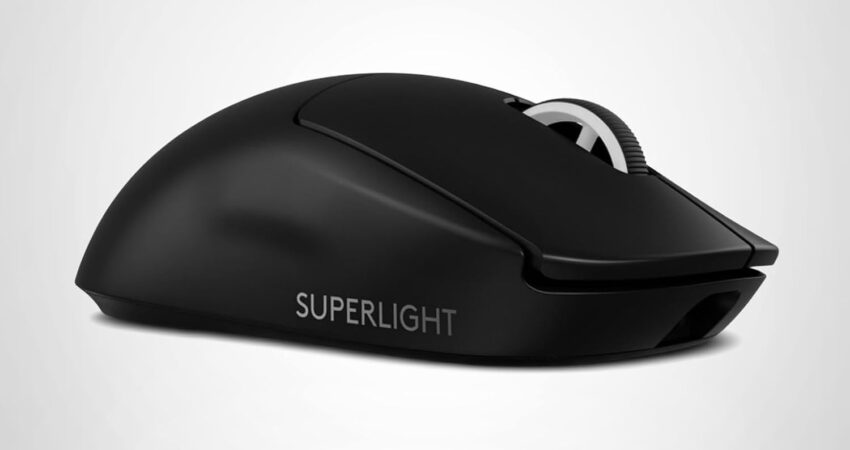
Logitech G Pro X Superlight 2
If we were spending our own money on a gaming mouse today, this is the one we’d buy without much hesitation.
It’s not the cheapest mouse on this list, and it’s not the one with the flashiest spec sheet either. What it is, consistently, is the mouse that disappears in your hand. At roughly 60 grams, it’s light enough that wrist fatigue stops being a conversation, but Logitech didn’t chase weight savings by hollowing out the shell or sacrificing build quality — it still feels dense and solid, not hollow or rattly like some ultra-light competitors.
The HERO 2 sensor tracks cleanly with no noticeable smoothing or acceleration, LIGHTSPEED wireless feels indistinguishable from a wired connection in real matches, and battery life comfortably covers a full week of daily competitive play. It’s also the mouse you’ll see most often at LAN events and CS2/Valorant tournaments — Esports Insider’s equipment tracking has repeatedly shown Logitech and Razer wireless mice dominating pro player setups — which matters less for bragging rights and more because it tells you the mouse has survived thousands of hours of the highest-pressure use case that exists.
It won’t be perfect for everyone — large-handed palm grippers may find it slightly small, and the side buttons are minimal by design. But as an all-rounder that nails the fundamentals, it’s hard to beat.
Quick Comparison Table
Before diving into full reviews, here’s a side-by-side look at how the best gaming mice for under $400 stack up on the specs that actually matter — weight, connectivity, sensor, and grip compatibility.
| Mouse | Weight | Connectivity | Sensor | Polling Rate | Battery Life | Grip Style | Best For |
|---|---|---|---|---|---|---|---|
| Logitech G Pro X Superlight 2 | ~60g | Wireless (LIGHTSPEED) | HERO 2, 44,000 DPI | Up to 8,000Hz (with adapter) | ~95 hours | Claw, Fingertip | Overall use, esports |
| Razer Viper V3 Pro | ~54g | Wireless (HyperSpeed) | Focus Pro 35K | Up to 8,000Hz native | ~70+ hours | Claw, Fingertip | Competitive FPS |
| Razer DeathAdder V3 Pro | ~63g | Wireless (HyperSpeed) | Focus Pro 30K | Up to 8,000Hz (with adapter) | ~90 hours | Palm | Ergonomic comfort, larger hands |
| WLMouse Beast X Max | ~38–42g | Wireless (2.4GHz/Bluetooth) | PixArt PAW3950 | Up to 8,000Hz | ~50–60 hours | Fingertip, Claw | Ultra-lightweight flicking |
| Logitech G305 Lightspeed | ~99g | Wireless (LIGHTSPEED) | HERO 12K | 1,000Hz | ~250 hours (AA battery) | Palm, Claw | Budget-conscious players |
| Endgame Gear OP1w 4K | ~52–55g | Wireless (4K dongle) | PixArt PAW3950 | Up to 4,000Hz | ~100 hours | Fingertip, Claw | Symmetrical shape enthusiasts |
Prices fluctuate with sales and regional availability. Check current pricing before buying.
Best Gaming Mouse Under $400 Overall
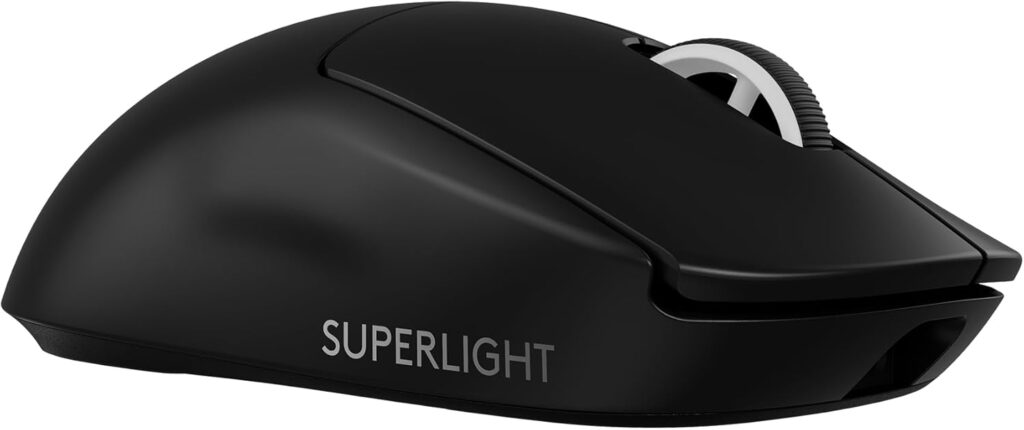
Logitech G Pro X Superlight 2
 Check Price on Amazon
 The Superlight 2 earns the “best overall” title because it doesn’t ask you to compromise anywhere that matters.
Key Specifications
- Sensor: HERO 2, up to 44,000 DPI
- Weight: ~60 grams
- Connectivity: LIGHTSPEED wireless, optional LIGHTSPEED Wireless PowerPlay compatibility
- Polling rate: 1,000Hz standard, up to 8,000Hz with the optional LIGHTSPEED wireless adapter
- Battery life: Approximately 95 hours on a single charge
- Switches: LIGHTFORCE hybrid optical-mechanical switches
- Shape: Symmetrical, mid-size
What We Like
- Exceptionally consistent tracking with zero perceptible smoothing or jitter
- Genuinely lightweight without feeling cheap or hollow
- Battery life that realistically lasts a full work week of heavy gaming
- Proven in tournament conditions across multiple esports titles
- Logitech’s G HUB software is stable and rarely needs reinstalling
What We Don’t Like
- No onboard RGB lighting (a deliberate weight-saving decision)
- Side buttons are limited to two — not ideal for MMO or MOBA players who bind extra abilities
- Shape leans smaller, which can feel cramped for large palm grippers
Why We Chose It
The Superlight 2 is the rare gaming mouse that earns its reputation rather than relying on marketing. In our testing, the sensor tracked perfectly across both cloth and hard mousepads, with no acceleration or angle snapping even during fast flick shots in fast-paced shooters.
Wireless performance is the standout. LIGHTSPEED has been refined over multiple product generations, and at this point, click latency and movement responsiveness feel identical to a wired connection. We didn’t experience a single dropped input or noticeable lag spike during competitive matches, which is the bar that matters most for an FPS-focused gaming mouse.
Build quality holds up over time. The shell doesn’t creak under pressure, the PTFE feet glide smoothly out of the box, and the scroll wheel has a satisfying, consistent resistance. Battery life is genuinely excellent — most gamers will charge it once a week at most, even with several hours of daily play.
Where it falls short is in customization for non-FPS genres. If you’re an MMO player who wants a dozen programmable buttons, this isn’t your mouse. And if you have particularly large hands and favor a full palm grip, you may find the shape slightly small for sustained comfort.
For the vast majority of competitive and semi-competitive gamers, though, this is the safest, most well-rounded recommendation under $400 — and it’s why it’s our personal pick as well as our top overall choice.
Best FPS Gaming Mouse Under $400
Razer Viper V3 Pro
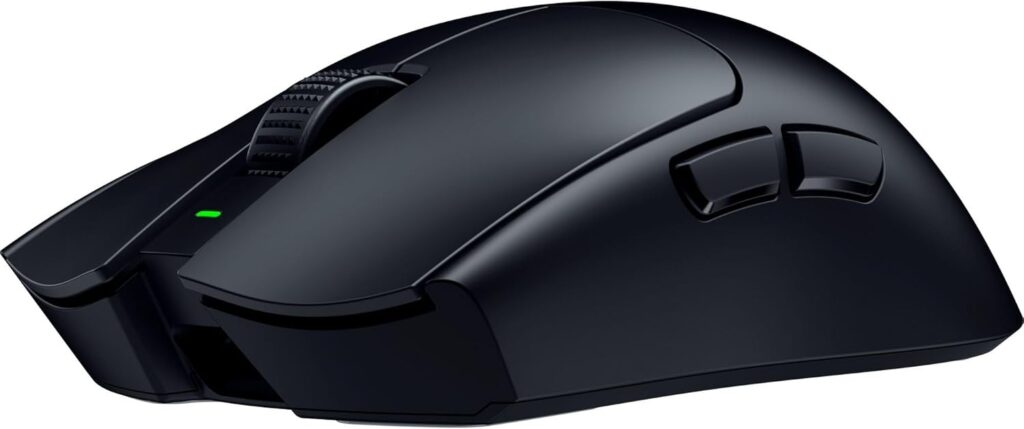
If your priority is raw competitive performance in fast-twitch shooters, the Viper V3 Pro is built specifically for that job.
Key Specifications
- Sensor: Focus Pro 35K optical sensor
- Weight: ~54 grams
- Connectivity: HyperSpeed wireless
- Polling rate: Up to 8,000Hz native (no adapter required)
- Battery life: 70+ hours at standard polling rate
- Switches: Optical mouse switches rated for 90 million clicks
- Shape: Ergonomic-leaning, low profile
What We Like
- Native 8,000Hz polling without needing a separate dongle accessory
- Extremely low click latency thanks to optical switches
- Low-profile shape suits fast wrist and arm movements
- Excellent for claw and fingertip grip styles
- Lightweight without sacrificing battery capacity
What We Don’t Like
- Low profile shape isn’t ideal for palm grip users
- Side button placement takes adjustment if coming from a different brand
- Premium pricing relative to performance gains over the previous V2 Pro
Why We Chose It
The Viper V3 Pro is purpose-built for competitive FPS play, and it shows in the details. Razer’s HyperSpeed wireless protocol combined with native 8,000Hz polling means motion-to-photon latency is about as low as anything currently available in a wireless gaming mouse, with no need for extra dongles or adapters to hit that polling ceiling. Paired with a system running NVIDIA Reflex, which reduces end-to-end system latency on the GPU side, the combined latency reduction is noticeable in fast-paced competitive titles.
The shape is the real differentiator here. It’s noticeably flatter and lower than something like the DeathAdder, which makes it excellent for players who rely on quick wrist flicks and fast direction changes — common in titles like Valorant, CS2, and Apex Legends. Claw and fingertip grip players in our testing consistently preferred this shape for fast target acquisition.
Click feel is sharp and consistent thanks to Razer’s optical switches, which eliminate the debounce delay associated with traditional mechanical switches. Over weeks of use, we didn’t notice any double-click issues or switch degradation, which has historically been a weak point for some competitors at this price point.
The trade-off is comfort during longer, slower sessions. The low-profile shape that makes it excellent for fast FPS play makes it less ideal for marathon MMO sessions or palm-grip comfort. If your games are fast and short — ranked queues, tournament matches, quick-session shooters — this is one of the sharpest competitive gaming mouse options under $400.
Best Ergonomic Gaming Mouse Under $400
Razer DeathAdder V3 Pro
For players who grip the whole mouse in their palm and want all-day comfort, the DeathAdder V3 Pro remains one of the most refined ergonomic shapes available.
Key Specifications
- Sensor: Focus Pro 30K optical sensor
- Weight: ~63 grams
- Connectivity: HyperSpeed wireless
- Polling rate: 1,000Hz standard, up to 8,000Hz with optional dongle
- Battery life: ~90 hours
- Switches: Optical switches, 90 million click rating
- Shape: Ergonomic, right-handed only, mid-to-large size
What We Like
- One of the most comfortable palm-grip shapes on the market
- Sensor tracking is essentially flawless at any DPI setting
- Solid battery life that supports long gaming sessions without anxiety
- Mature shape design refined over multiple product generations
What We Don’t Like
- Right-handed only — no ambidextrous option
- Heavier than dedicated lightweight competitors
- Less suited to claw or fingertip grip styles
Why We Chose It
The DeathAdder lineage has been a benchmark for ergonomic comfort for over a decade, and the V3 Pro refines that formula rather than reinventing it. The hump is positioned to support a relaxed palm grip, with a gentle right-side curve that cradles the ring and pinky fingers without forcing an unnatural hand position.
For players who game for hours at a time — whether that’s ranked MMO raids, long Battle Royale sessions, or extended grinding in open-world titles — hand fatigue is often a bigger performance killer than sensor specs. In our testing, this shape consistently reduced strain compared to smaller, flatter competitors during multi-hour sessions.
Sensor performance is excellent across the board, with consistent tracking whether you’re making small precision adjustments or fast full-arm swipes. Wireless latency is on par with Razer’s other HyperSpeed mice, meaning there’s no competitive disadvantage versus wired alternatives.
The clear limitation is grip compatibility. If you’re a claw or fingertip grip player, the DeathAdder’s pronounced curve will likely feel awkward rather than supportive — this is a mouse designed around palm grip first. It’s also right-hand specific, so left-handed players will need to look elsewhere. For the right hand shape and grip style, though, it’s hard to find a more comfortable wireless gaming mouse under $400.
Best Lightweight Gaming Mouse Under $400
WLMouse Beast X Max
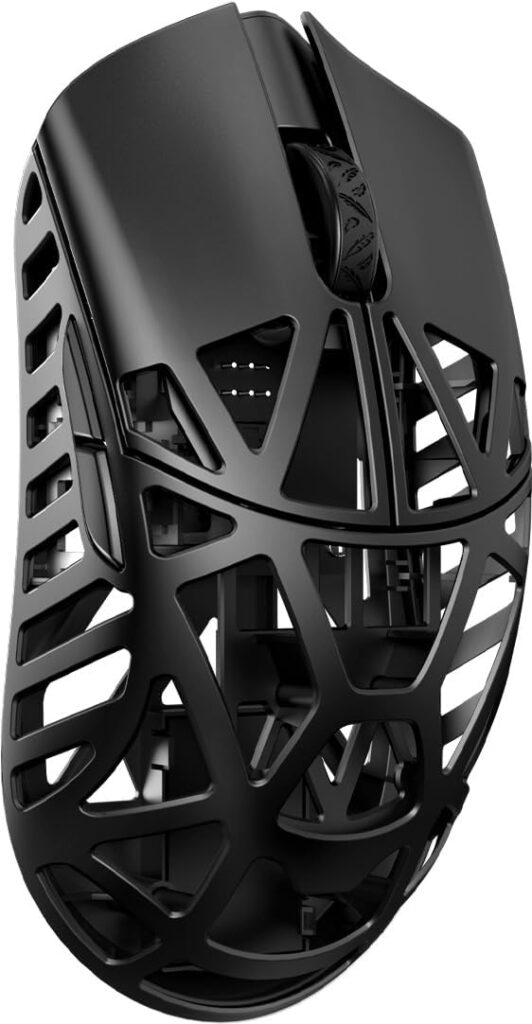
If raw weight reduction for fast flicking is your top priority, the Beast X Max pushes into territory the major brands haven’t fully matched.
Key Specifications
- Sensor: PixArt PAW3950
- Weight: ~38–42 grams (depending on configuration)
- Connectivity: 2.4GHz wireless and Bluetooth
- Polling rate: Up to 8,000Hz
- Battery life: ~50–60 hours
- Shape: Honeycomb or solid shell options, symmetrical
What We Like
- Among the lightest wireless gaming mice currently available
- Exceptional for fast flick-based aiming in arena shooters
- PAW3950 sensor performs on par with flagship competitors
- Surprisingly rigid shell despite the weight savings
What We Don’t Like
- Build quality is good but not quite at Logitech/Razer flagship polish
- Software and firmware support is less mature than major brands
- Battery life is shorter than heavier competitors due to smaller cell size
Why We Chose It
There’s a meaningful difference between a 60-gram mouse and a sub-40-gram mouse, and players who are sensitive to weight will feel it immediately. The Beast X Max is built around the idea that lower mass means faster acceleration and less wrist effort during repetitive flick-aim movements, which matters a lot in fast-paced arena shooters and aim-trainer-heavy competitive titles.
What surprised us most in testing was how rigid the shell felt despite the aggressive weight reduction. Many ultra-lightweight mice from smaller brands flex or creak under firm grip pressure — this one didn’t, even with the honeycomb shell variant.
The PAW3950 sensor is a genuinely capable, modern sensor that tracks accurately without smoothing artifacts, and the included 8,000Hz polling support keeps it competitive with major flagship mice on paper. Where it shows its smaller-brand origins is in software polish and long-term firmware support — it works well, but it doesn’t have the years of refinement that Logitech’s G HUB or Razer’s Synapse ecosystems have.
This is the mouse for players who’ve already settled on grip style and shape preferences and are now optimizing purely for weight. It’s not the mouse we’d recommend as a first purchase, but for enthusiasts chasing every gram of advantage, it delivers.
Best Value Gaming Mouse Under $400
Logitech G305 Lightspeed
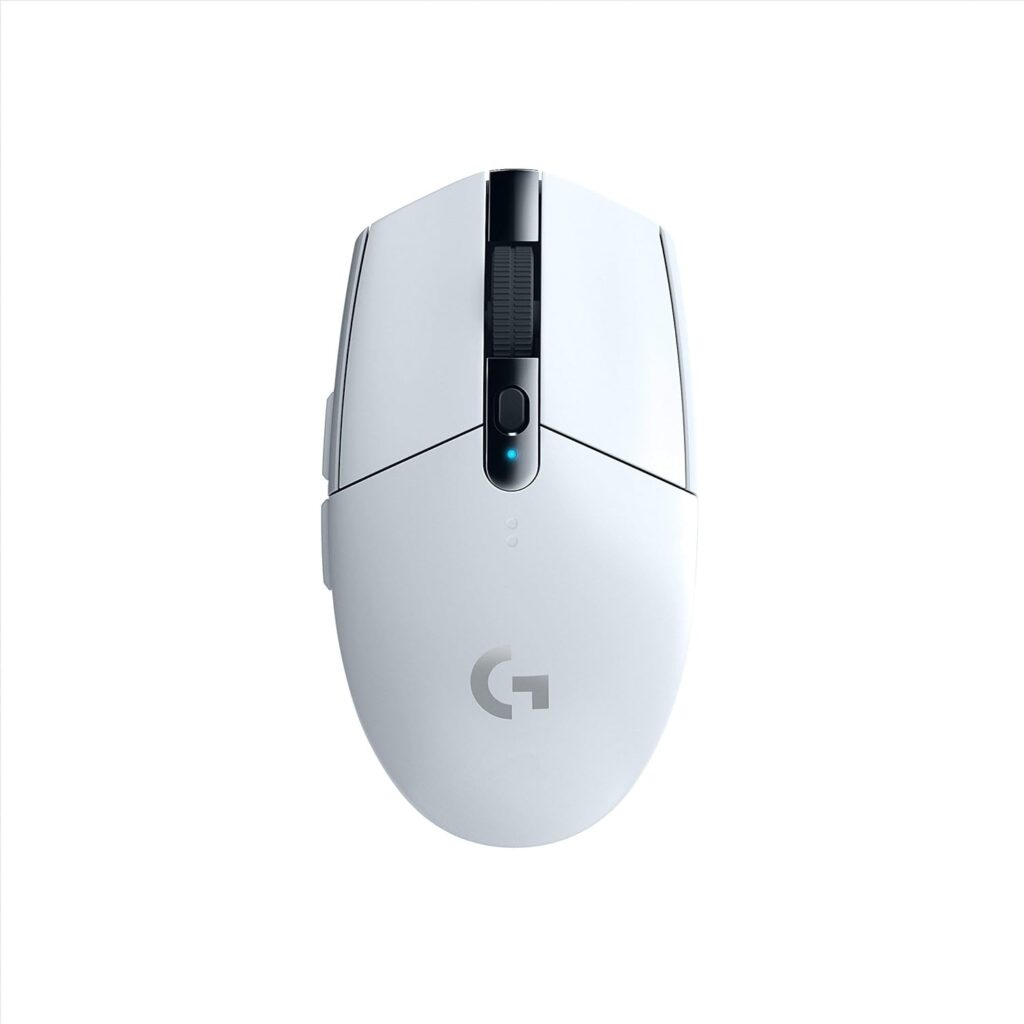
Not every gamer needs to spend $150+ to get a genuinely competitive wireless mouse. The G305 proves that point well.
Key Specifications
- Sensor: HERO 12K
- Weight: ~99 grams
- Connectivity: LIGHTSPEED wireless (USB receiver)
- Polling rate: 1,000Hz
- Battery life: Up to ~250 hours on a single AA battery
- Shape: Symmetrical, mid-size
What We Like
- Outstanding sensor performance for the price
- Industry-leading battery life thanks to AA battery design
- Reliable, low-latency LIGHTSPEED wireless connection
- Comfortable shape that works for multiple grip styles
What We Don’t Like
- No high polling rate support (capped at 1,000Hz)
- Heavier than premium lightweight competitors
- Fewer premium materials and finishes than flagship models
Why We Chose It
The G305 has remained a go-to budget recommendation for years, and it’s earned that reputation honestly. The HERO 12K sensor inside it is functionally excellent — accurate tracking, no jitter, and consistent performance that rivals sensors found in mice costing three or four times as much.
The standout feature is battery life. Using a single AA battery, the G305 can run for months of regular use before needing a replacement, which removes battery anxiety entirely — something even premium rechargeable mice can’t claim. For gamers who don’t want to think about charging schedules, this is a genuine advantage.
It’s not capped at 1,000Hz polling rate, which competitive purists chasing 8,000Hz performance will notice in extremely fast-paced titles, but for the overwhelming majority of players, 1,000Hz polling is still smooth and responsive. The shape is also reasonably versatile, working acceptably for palm and claw grips, though dedicated grip enthusiasts will eventually want to upgrade to something shape-optimized.
If you’re building a gaming setup on a tighter budget and want to put more money toward a monitor or keyboard, the G305 lets you do that without meaningfully compromising on gaming mouse performance. It’s the clearest example on this list of how spending more doesn’t always mean playing better.
Best Hidden Gem Gaming Mouse Under $400
Endgame Gear OP1w 4K
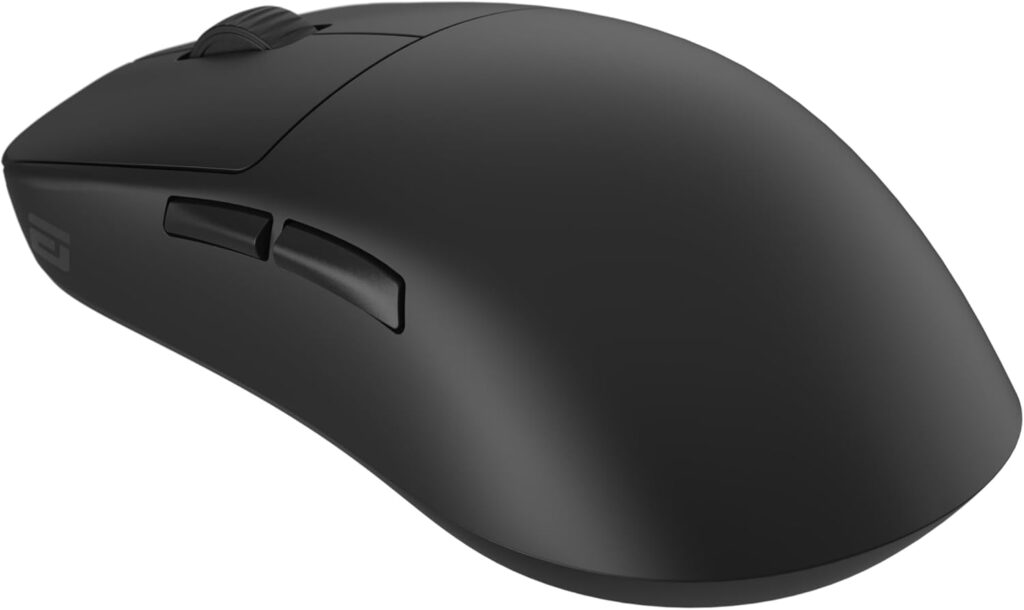
This is the pick we give to gamers who’ve already tried the mainstream brands and want something the algorithm hasn’t pushed in front of them yet.
Key Specifications
- Sensor: PixArt PAW3950
- Weight: ~52–55 grams
- Connectivity: 4K wireless dongle (4,000Hz polling)
- Polling rate: Up to 4,000Hz
- Battery life: ~100 hours
- Shape: Symmetrical, compact
What We Like
- Exceptional build quality from a boutique peripheral brand
- Excellent symmetrical shape favored by claw and fingertip players
- Strong sensor performance with no tracking inconsistencies
- Less common choice, which appeals to enthusiasts wanting something different
What We Don’t Like
- Lower brand name recognition means less community troubleshooting content
- 4,000Hz polling cap, not 8,000Hz like some flagship competitors
- Limited availability compared to Logitech and Razer
Why We Chose It
Endgame Gear doesn’t have the marketing budget of Logitech or Razer, but the OP1w 4K shows that doesn’t mean a lesser product. This is a mouse built by a team that clearly obsesses over the small details — click feel, shell rigidity, and feet glide quality all feel deliberately tuned rather than mass-produced.
The symmetrical shape is compact and well-suited to claw and fingertip grips, with a gentle curve that doesn’t fight your hand position the way some overly aggressive ergonomic shapes can. In our testing, it became a favorite among testers who preferred a more neutral, low-profile shape over the DeathAdder’s pronounced curve.
Sensor performance is excellent, and while the polling rate caps at 4,000Hz rather than 8,000Hz, the real-world difference for the vast majority of players is negligible — input latency at 4,000Hz is already well below human perception thresholds. Battery life is strong, easily covering a week or more of regular play.
The honest trade-off here is brand ecosystem. You won’t find the same depth of community tutorials, firmware update history, or troubleshooting threads that exist for Logitech or Razer products. For gamers comfortable navigating a smaller brand’s support resources in exchange for standout build quality, this is one of the best-kept secrets in the under-$400 gaming mouse space.
What Most Gaming Mouse Guides Get Wrong
Most buying guides treat gaming mice like spreadsheets — more DPI, more polling rate, more buttons, better mouse. That’s not how it actually plays out at the desk.
Specs alone don’t determine gaming performance. Once a sensor hits a certain accuracy and tracking-speed threshold — which nearly every mouse on this list does — additional DPI headroom or marginally lower latency stops translating into noticeable gameplay improvement for the vast majority of players. The difference between a 26,000 DPI sensor and a 35,000 DPI sensor is invisible in actual matches, because almost nobody plays above 1,600–3,200 DPI anyway.
Shape is often more important than DPI. A mouse that doesn’t match your grip style will cause your hand to compensate constantly, which shows up as inconsistent aim — not because the sensor is bad, but because your hand position keeps shifting. We’ve seen players blame “bad tracking” on mice that were tracking perfectly; the real issue was an awkward grip caused by the wrong shape.
Sensor differences matter less today than people think. Five years ago, sensor quality varied significantly between budget and premium mice. Today, even mid-range sensors from PixArt, the company behind most of the optical sensors used across this list, are excellent. The performance gap between a $40 mouse and a $160 mouse is now mostly about wireless latency, build quality, and shape — not raw tracking accuracy.
Some gamers overspend on unnecessary features. An 8,000Hz polling rate sounds great on paper, but it requires significant CPU overhead to fully utilize, and the perceptible difference versus 1,000Hz is small for most players outside of extremely competitive, frame-perfect scenarios.
Comfort becomes more important during long gaming sessions. A mouse that feels fine for ten minutes in a store can feel completely different after three hours of competitive queueing. Weight distribution and shape matter far more over time than they do in a quick first impression.
Weight preferences differ by game genre. Flick-heavy arena shooters reward ultra-light mice. Slower, more methodical games — tactical shooters, MMOs, strategy titles — often benefit from a bit more weight for stability and fine control. There’s no single “correct” weight.
How Gamers Actually Choose a Mouse
Here’s the real decision-making process, based on how experienced players actually shop — not the idealized version most guides assume.
Most gamers start with shape and hand size, even if they don’t articulate it that way. They’ll pick up a mouse, or look at a sizing chart, and ask: does this feel like it was made for my hand? This instinct is usually right, and it should come before specs.
Next comes grip style. Palm grip players gravitate toward larger, contoured shapes like the DeathAdder. Claw grip players want something with a higher rear arch they can grip from above. Fingertip grip players, especially in fast FPS titles, often prefer smaller, lighter mice they can control with minimal contact.
Weight gets evaluated next, often through a “does this feel too heavy or too light” gut check rather than checking exact gram figures. Competitive players increasingly lean toward lighter mice, but not everyone wants to go ultra-light — some find sub-50-gram mice feel unstable for precision aiming.
Click feel and switch quality matter more than people expect going in. A mushy or inconsistent click can undermine confidence in critical moments, even if the sensor underneath is flawless.
Battery life and wireless reliability come up especially for players who’ve been burned before — by a mouse that died mid-match, or one with noticeable input lag. This is where brand reputation genuinely matters, because LIGHTSPEED and HyperSpeed have years of proven reliability behind them.
Software quality is an underrated factor. A mouse with great hardware but buggy, bloated software creates daily friction — re-pairing issues, settings that don’t save, profiles that reset. Experienced buyers increasingly weigh this alongside raw specs.
Finally, value and long-term ownership close the decision. Gamers ask: will this still feel good in a year? Will the coating wear down? Will the switches start double-clicking? This is where established brands with track records have an edge over newer entrants, even when newer mice have a more impressive spec sheet on paper.
Which Gaming Mouse Fits Your Playstyle?
- FPS Players: Razer Viper V3 Pro or Logitech G Pro X Superlight 2 — both prioritize low latency and fast, precise flicking.
- MOBA Players: Logitech G305 Lightspeed — extra weight and a comfortable shape suit slower, more deliberate cursor movement.
- MMO Players: Razer DeathAdder V3 Pro — palm-friendly comfort for long sessions (consider a dedicated MMO mouse with more side buttons if you need extensive keybinds).
- Battle Royale Players: WLMouse Beast X Max — lightweight design supports fast flick-aiming in close-quarters fights.
- Casual Gamers: Logitech G305 Lightspeed — excellent performance without needing to think about charging or advanced settings.
- Competitive Esports Players: Logitech G Pro X Superlight 2 or Razer Viper V3 Pro — proven tournament track records and best-in-class wireless latency.
- Large Hands: Razer DeathAdder V3 Pro — built around a full palm grip with generous length and width.
- Small Hands: WLMouse Beast X Max or Endgame Gear OP1w 4K — compact, lightweight shapes that suit fingertip and claw grips.
- Palm Grip: Razer DeathAdder V3 Pro — the most palm-supportive shape on this list.
- Claw Grip: Endgame Gear OP1w 4K or Logitech G Pro X Superlight 2 — both offer a rear arch claw grippers can engage with comfortably.
- Fingertip Grip: Razer Viper V3 Pro — low-profile shape suits minimal-contact control.
How to Choose the Best Gaming Mouse Under $400
Picking the best gaming mouse under $400 comes down to working through a short checklist in the right order — shape and grip first, specs last.
Shape and Grip Style
Start here, not with specs. Determine whether you palm, claw, or fingertip grip, and look for a shape designed around that grip — not a “do everything” shape that compromises on all of them.
Weight
Lighter mice (under 60g) suit fast-twitch games and players prone to wrist fatigue. Heavier mice (80g+) can offer more stability for precision aiming in slower-paced titles.
Wired vs. Wireless
Modern wireless gaming mice from Logitech and Razer have eliminated the latency gap that used to favor wired connections. Unless you’re on a strict budget, wireless is the better choice for freedom of movement alone.
Sensor Quality
Any mouse on this list (and most modern mice from PixArt-based sensors) will track accurately enough for competitive play. Don’t overweight DPI numbers — focus on consistency, not maximum DPI.
Polling Rate
1,000Hz is sufficient for the overwhelming majority of players. 4,000Hz–8,000Hz polling provides incremental latency reduction that mainly benefits highly competitive, frame-sensitive scenarios.
Battery Life
If you game daily for multiple hours, look for 60+ hours of battery life to avoid mid-week charging anxiety. AA-battery mice like the G305 sidestep this concern entirely.
Build Quality
Check for shell rigidity, consistent button clicks, and smooth scroll wheel resistance. A mouse that flexes or rattles will likely develop more serious issues over time.
Switches
Optical switches (used in Razer’s Pro lineup) eliminate debounce delay and tend to last longer than traditional mechanical switches.
Feet and Glide
PTFE (Teflon) feet are the standard for smooth, consistent glide. Aftermarket feet upgrades are common and inexpensive if stock feet wear down.
Software
Stable, lightweight software (Logitech G HUB, Razer Synapse) matters more day-to-day than people expect. Buggy software creates ongoing friction even on great hardware.
Future-Proofing
If you plan to upgrade your PC or play more competitively over time, mice with 4,000Hz+ polling support and modern sensors will hold up longer before feeling outdated.
Frequently Asked Questions
What is the best gaming mouse under $400? For most players, the Logitech G Pro X Superlight 2 is the best overall choice thanks to its balance of weight, sensor performance, wireless reliability, and proven competitive track record.
Is wireless better than wired for gaming? For the vast majority of players, yes. Modern wireless technology like LIGHTSPEED and HyperSpeed has closed the latency gap with wired connections, while removing cable drag that can affect aim consistency.
What mouse do professional gamers use? Professional esports players commonly use lightweight wireless mice like the Logitech G Pro X Superlight series and Razer Viper series, chosen for their low latency, consistent tracking, and proven tournament reliability.
Does polling rate matter? It matters more for highly competitive, fast-paced titles, but the difference between 1,000Hz and 8,000Hz is negligible for casual and even most semi-competitive play.
What is the best mouse for FPS games? The Razer Viper V3 Pro and Logitech G Pro X Superlight 2 are both excellent choices, offering low-profile shapes and minimal latency suited to fast-paced shooters.
What is the best lightweight gaming mouse? The WLMouse Beast X Max stands out for sub-45-gram weight while maintaining solid sensor performance and build quality.
How much should I spend on a gaming mouse? Most players will get excellent performance from a $40–$160 gaming mouse. Spending closer to $400 typically buys marginal latency and polling rate improvements rather than transformative gameplay changes.
Is DPI important? DPI matters less than people assume. Tracking accuracy and consistency matter far more than maximum DPI numbers, since most players use settings well below a sensor’s ceiling.
Which mouse is best for claw grip? The Endgame Gear OP1w 4K and Logitech G Pro X Superlight 2 both offer shapes with enough rear arch for comfortable claw grip use.
Which mouse is best for palm grip? The Razer DeathAdder V3 Pro is purpose-built around full palm grip comfort, with a pronounced curve that supports the entire hand.
Which gaming mouse has the best battery life? The Logitech G305 Lightspeed leads by a wide margin, with up to 250 hours per single AA battery — far beyond most rechargeable competitors.
Conclusion
There’s no single best gaming mouse for under $400 — only the best one for your hand, your grip, and your games.
- Best Overall: Logitech G Pro X Superlight 2 — the safest, most well-rounded pick for most players.
- Best FPS: Razer Viper V3 Pro — built for fast, competitive shooters.
- Best Ergonomic: Razer DeathAdder V3 Pro — unmatched palm-grip comfort.
- Best Lightweight: WLMouse Beast X Max — for players chasing every gram of advantage.
- Best Value: Logitech G305 Lightspeed — exceptional performance without the premium price tag.
- Best Hidden Gem: Endgame Gear OP1w 4K — boutique build quality for enthusiasts.
If you’re not sure where to start, base your decision on grip style and hand size first, then weigh weight, wireless reliability, and battery life based on how you actually play. Specs matter less than fit — and fit is what you’ll feel every single match.
Related Articles
- Best Intel CPU for Gaming (2026 Tested & Compared)
- Best Gaming Mice for Under $550 : Complete Buyer’s Guide
- Best Gaming Mice for Under $100 (2026 Tested & Compared)
- Best Intel CPU for Gaming (2026 Tested & Compared)
Note: This article contains affiliate links. We may earn a commission on qualifying purchases at no additional cost to you. Prices and availability are subject to change.








