




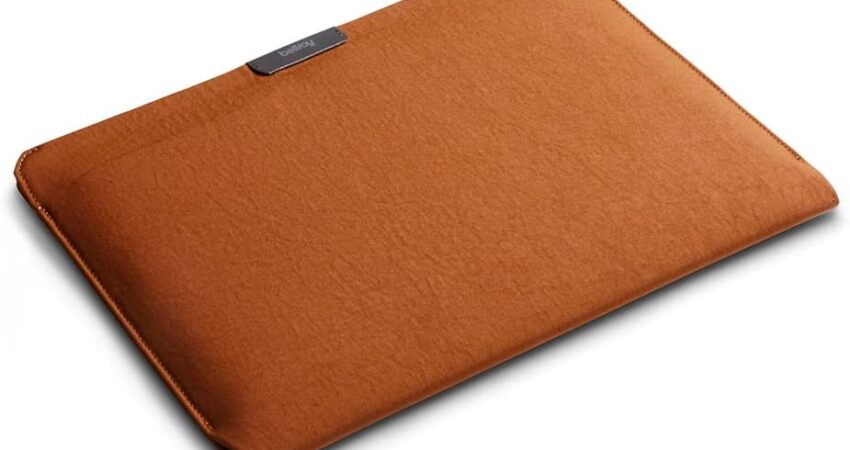
A MacBook Pro sleeve is one of the simplest, most practical investments you can make to protect an expensive machine — but choosing the wrong one is easier than most people think.
We’ve carried MacBooks daily for years: across airports, into coffee shops, through university libraries, on client visits, and during long stretches of remote work. In that time, we’ve tested dozens of sleeves, watched colleagues ruin laptops with cheap cases, and developed very strong opinions about what actually matters when protecting a premium computer.
Here’s the honest truth: not all sleeves are equal. A $15 option from a no-name brand and a $120 leather sleeve from a premium manufacturer don’t necessarily offer proportional protection. And an expensive sleeve can actually cause more harm than a modest one if the fit is wrong, the zipper is sharp, or the internal lining is rough enough to scratch an aluminum chassis.
Our goal in this guide isn’t to send you to the most expensive option or the one with the highest affiliate margin. It’s to match you with the sleeve that fits how you actually use your MacBook — whether that’s daily commuting, international travel, professional client meetings, or campus life.
Let’s get into it.
Our Personal Pick (Quick Winner)
If we had our own money on the line right now, we’d buy the Tomtoc Defender Series.
It hits a rare combination of serious protection, smart organization, and everyday usability that very few sleeves in any price range manage to pull off. The corner guards work. The water-resistant exterior handles rain and coffee counter spills. The accessory pocket actually fits a charger. And it doesn’t feel cheap or fragile after months of daily use.
We’ll cover all six of our top picks in detail below — but if you need a fast answer, the Tomtoc Defender is the one we’d stake our MacBook on.
MacBook Pro Sleeve Comparison Table
| Product | Material | Protection Level | Water Resistance | Accessory Storage | Best For |
|---|---|---|---|---|---|
| Tomtoc Defender Series | Ballistic nylon + EVA | ★★★★★ | ✅ Yes | ✅ Front pocket | Best Overall |
| MOSISO Laptop Sleeve | Neoprene | ★★★☆☆ | ✅ Light | ❌ None | Budget Buyers |
| Bellroy Laptop Sleeve | Recycled woven | ★★★★☆ | ✅ Water-repellent | ✅ Cable organizer | Premium Minimalists |
| Native Union Stow Lite | Premium fabric | ★★★★☆ | ✅ Yes | ✅ Accessory pocket | Professionals |
| MOFT Carry Sleeve | Microfiber + polymer | ★★★★☆ | ✅ Yes | ✅ Stand + storage | Frequent Travelers |
| Comfyable Leather Sleeve | PU leather | ★★★☆☆ | ⚠️ Moderate | ✅ Small pocket | Style-Focused |
The 6 Best MacBook Pro Sleeves in 2026
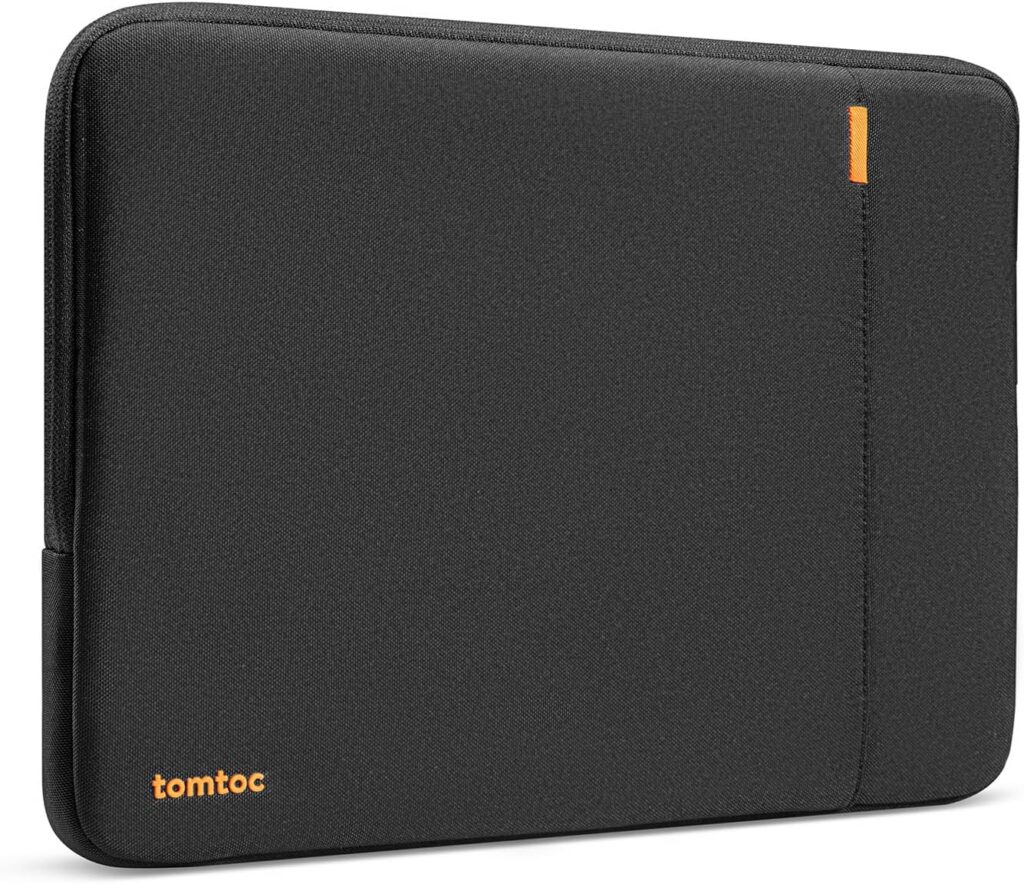
🏆 Best Overall — Tomtoc Defender Series
 Check Price on Amazon
 The sleeve that actually does what every sleeve claims to.
The Tomtoc Defender Series has been one of the most consistently well-regarded MacBook protection sleeves for good reason. It’s built around a genuine protection philosophy rather than just aesthetics — and after daily use, that difference becomes obvious.
Key Specifications
- Compatible sizes: 13″, 14″, 16″ MacBook Pro models
- Material: 360° CornerArmor ballistic nylon exterior + thick EVA foam padding
- Water resistance: Water-repellent exterior with sealed zipper
- Accessory storage: Front zippered pocket (fits charger, cables, adapter)
- Weight: Approx. 0.55 lbs (14″ version)
- Available colors: Black, Navy, Gray, Khaki
What We Like
- Genuine corner protection that adds meaningful drop resistance, not just padding
- Snug, precise internal fit that prevents your MacBook from shifting during transit
- Sealed zipper design significantly reduces risk of zip teeth scratching the chassis
- Front pocket large enough for a 67W USB-C charger, cable, and SD cards
- Soft fleece interior lining won’t scratch the lid or palm rest
- Holds up extremely well over months of daily use without fraying or deforming
What We Don’t Like
- Slightly bulkier than ultra-slim sleeves — not ideal for ultra-minimalist carry setups
- Color selection is functional but not particularly exciting
- The ballistic nylon exterior attracts lint in some environments
Why We Chose It
The Tomtoc Defender earns its top recommendation because it solves the core problem most sleeves quietly fail at: genuine corner protection.
Most sleeves use uniform padding across the entire surface. The Defender adds reinforced corner guards — and corners matter because that’s where almost every real-world impact lands. Drop a bag on hard tile, knock it off a desk, or catch a door on your sleeve — the damage almost always initiates at a corner.
For daily commuters and students carrying a MacBook in a bag alongside textbooks, water bottles, and chargers, this level of corner-specific reinforcement is genuinely meaningful.
The front pocket is deeper than it looks, which surprised us. A 67W Apple USB-C charger, a MagSafe cable, and a USB-C hub all fit simultaneously — which means this sleeve can carry your full daily MacBook kit in one organized package.
The zipper design also deserves a mention. Cheap zippers on thin sleeves can contact the MacBook chassis during opening and closing, leaving fine scratches on the aluminum edge. The Tomtoc’s zipper sits recessed inside a channel that keeps the metal teeth away from your machine.
Ideal for: Students, daily commuters, anyone who wants maximum real-world protection without moving to a full hard-shell case.
Long-term value: Exceptional. The ballistic nylon exterior resists abrasion, the corner guards maintain their shape, and the zipper still operates smoothly after heavy use.
💰 Best Budget — MOSISO Laptop Sleeve
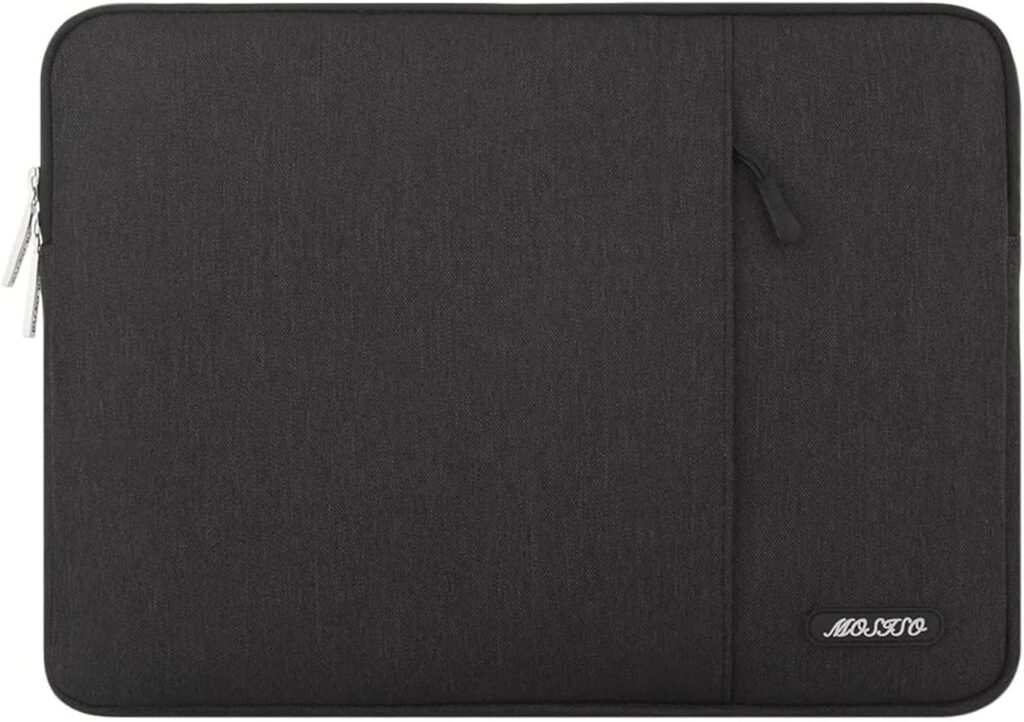
Proof that you don’t need to spend much to get reliable everyday protection.
The MOSISO Laptop Sleeve is a fixture in university libraries and coffee shops for good reason. At around $15–$22, it delivers a surprisingly capable experience for buyers who need basic scratch and bump protection without overthinking the purchase.
Key Specifications
- Compatible sizes: 13″, 14″, 16″ models available
- Material: Premium neoprene
- Water resistance: Light water resistance (splash-proof, not waterproof)
- Accessory storage: None (sleeve only)
- Weight: Approx. 0.35 lbs
- Available colors: 20+ color and pattern options
What We Like
- Soft neoprene interior genuinely protects against scratches and minor impacts
- Slim profile fits easily inside any bag without adding meaningful bulk
- Wide range of colors and patterns — easier to find in a crowded bag
- Machine-washable in cold water — unusually practical for everyday carry
- Accurate sizing for MacBook Pro models with no awkward slack or over-tightness
- Surprisingly durable zipper for the price point
What We Don’t Like
- No accessory storage whatsoever — you’re carrying a second bag for cables
- Neoprene provides limited structural protection against harder impacts
- No corner reinforcement
- Water resistance is minimal — a heavy rain or spilled drink could cause issues
Why We Chose It
For students, occasional travelers, and buyers who keep their MacBook inside a well-padded laptop bag most of the time, the MOSISO provides exactly what’s needed: scratch prevention, light bump protection, and a slim form factor that disappears inside any carry setup.
The neoprene construction is gentler on MacBook surfaces than many alternatives. Neoprene stretches slightly to conform to your laptop’s exact dimensions, which means no awkward movement inside the sleeve during transit.
The machine-washable design is a genuinely underrated feature. After months of daily carry, fabric sleeves accumulate grime inside. Being able to toss this in a cold wash and restore it to near-new condition is a practical advantage most sleeves at any price point don’t offer.
The color range also matters more than it sounds. A MacBook Pro sleeve in a distinctive color or pattern is immediately identifiable at the bottom of a bag or on a crowded library table — which has real value if you’re the type to work in busy environments.
Ideal for: Students, casual users, buyers who prioritize slim carry over maximum protection, and anyone working to a tight budget.
Long-term value: Reasonable. Neoprene degrades faster than ballistic nylon, and the zipper will show wear after 12–18 months of heavy use. At this price, many owners simply replace it annually rather than investing in a more expensive alternative.
✨ Best Premium — Bellroy Laptop Sleeve
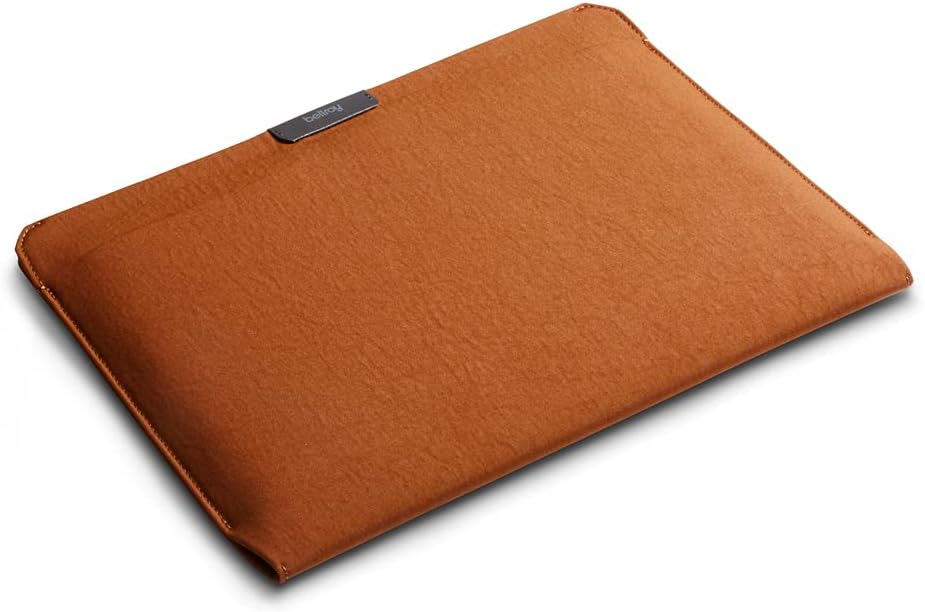
The sleeve for people who want their MacBook kit to look as good as their MacBook.
Bellroy has built a reputation for premium carry accessories that use quality materials, thoughtful design, and long-term durability as their core differentiators. The Bellroy Laptop Sleeve is a strong extension of that reputation — and the first premium laptop sleeve for MacBook Pro we’ve used that genuinely justifies the price gap over budget alternatives.
Key Specifications
- Compatible sizes: 13″, 14″, 16″ MacBook Pro available
- Material: Recycled woven exterior + soft suede-like interior lining
- Water resistance: Water-repellent DWR finish
- Accessory storage: Internal cable organizer sleeve + card pocket
- Weight: Approx. 0.40 lbs
- Available colors: Basalt, Navy, Black, Midnight
What We Like
- The recycled woven exterior looks and feels premium without mimicking leather
- DWR (Durable Water Repellent) coating handles real-world moisture well
- Cable management sleeve keeps accessories organized rather than tangled
- Extremely slim for the protection level it provides
- Exceptional fit and finish — no loose threads, uneven stitching, or creaking hardware
- The suede-like interior protects against fine scratching without adding bulk
- Bellroy backs products with a 3-year warranty
What We Don’t Like
- At $80–$100, it’s a meaningful investment for a sleeve alone
- No dedicated exterior accessory pocket — the internal organizer works but requires opening the main sleeve
- The woven exterior can show abrasion marks in high-friction carry environments over time
Why We Chose It
The Bellroy Laptop Sleeve sits in a category of its own because it achieves something most premium sleeves don’t: it manages to be simultaneously slim, organized, and genuinely premium-feeling without relying on leather or heavy padding to make that impression.
The recycled woven material is tactile in a way that synthetic alternatives rarely are. It feels structured in hand but doesn’t add the stiffness or weight that padded sleeves typically carry. In professional contexts — boardrooms, client offices, co-working spaces — this sleeve carries a visual credibility that makes the MacBook Pro setup feel cohesive and intentional rather than afterthought-organized.
The internal cable organizer is more useful than it initially sounds. Instead of cramming a charger into a pocket and hoping nothing tangles, the Bellroy’s internal layout gives each component a dedicated slot. The setup and breakdown routine for a full day of work becomes meaningfully smoother over time.
Ideal for: Creative professionals, designers, consultants, and anyone who wants premium carry aesthetics with genuine functional design.
Long-term value: Strong. The DWR finish can be refreshed periodically, the materials age gracefully, and the 3-year warranty provides genuine peace of mind.
💼 Best Professional — Native Union Stow Lite Sleeve
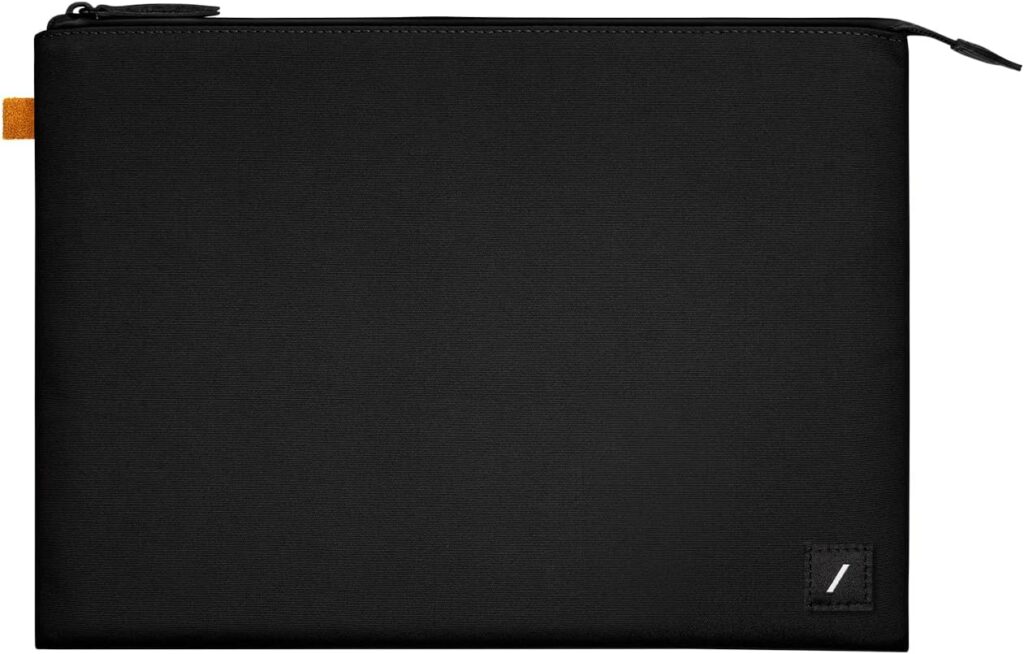
Clean, composed, and quietly excellent — exactly what professionals need.
Native Union has spent years designing accessories that belong in Apple’s product ecosystem without being sold there. The Stow Lite Sleeve is the cleanest expression of that philosophy: a MacBook Pro laptop sleeve that disappears into professional contexts while doing its job extremely well.
Key Specifications
- Compatible sizes: 14″ and 16″ MacBook Pro specifically
- Material: Recycled fabric exterior + soft microfiber interior
- Water resistance: Water-resistant treated fabric
- Accessory storage: Front accessory pocket with cable management
- Weight: Approx. 0.45 lbs
- Available colors: Slate, Frost, Kraft, Black
What We Like
- Minimal, considered design that reads as professional without trying too hard
- Front pocket with internal organization fits charger, cables, and small accessories cleanly
- The fit on 14″ and 16″ MacBook Pro is precise — no slack or movement inside the sleeve
- Very soft interior lining with zero scratching risk on aluminum and glass surfaces
- Handles airport security conveyor belts, coffee shop tables, and client visits with equal ease
- Magnetic closure option on certain variants adds convenience without compromising security
What We Don’t Like
- Padding is more modest than the Tomtoc — better for professional environments than high-impact travel
- Color range is deliberately restrained — great for some, limiting for others
- Slightly higher price than the protection level alone might justify
Why We Chose It
The Native Union Stow Lite earns its professional recommendation not through any single dramatic feature, but through the cumulative effect of small design decisions made correctly.
The fit is one example. MacBook Pro models — particularly the 14-inch with its slightly unusual proportions — can fit awkwardly in sleeves that claim compatibility but were designed around older dimensions. The Stow Lite is cut precisely for current-generation MacBook Pro bodies, which means your machine doesn’t shift, slide, or sit unevenly inside the sleeve.
The front pocket design is another example of getting the details right. Rather than a single dump-everything pocket, there’s internal structure that keeps charging cables from becoming a tangled mess. After a week, that kind of organization becomes something you notice when it’s absent in other sleeves.
For professionals who carry a MacBook Pro into client meetings or high-visibility presentations, the visual presentation of how you carry your equipment matters more than most buyers initially admit. The Stow Lite looks deliberate — which reflects well on whoever carries it.
Ideal for: Consultants, account managers, lawyers, architects, finance professionals, and anyone carrying a MacBook into environments where first impressions matter.
Long-term value: Good. The recycled fabric holds up well, and the precise fit means the MacBook isn’t working against the sleeve’s structure during daily use.
✈️ Best Travel — MOFT Carry Sleeve
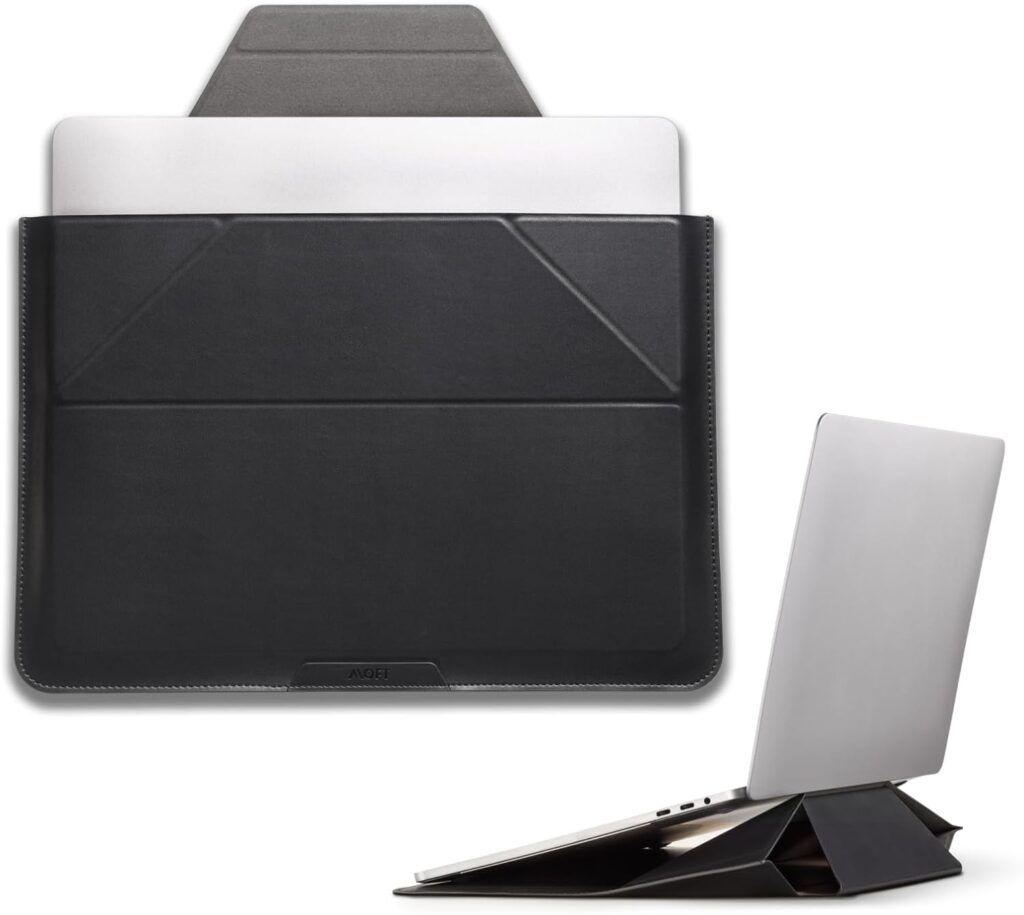
A laptop sleeve that thinks like a traveler built it.
MOFT has built a strong reputation in the MacBook accessory space through products that add genuine functionality without adding bulk — and the Carry Sleeve is the best expression of that design philosophy. For frequent travelers and digital nomads, this isn’t just a MacBook travel sleeve. It’s a carry system.
Key Specifications
- Compatible sizes: 13″, 14″, 16″ versions available
- Material: Microfiber exterior + polymer structure + soft internal lining
- Water resistance: Water-resistant exterior
- Accessory storage: Multiple pockets + integrated laptop stand function
- Weight: Approx. 0.65 lbs (heavier due to stand mechanism)
- Available colors: Midnight Blue, Space Gray, Sandstone
What We Like
- Integrated stand function elevates the MacBook to a healthier viewing angle — genuinely useful in hotel rooms, airport lounges, and co-working spaces
- Water-resistant exterior handles travel environments confidently
- Multiple organized pockets for passport-size accessories, cables, and cards
- Structure prevents the sleeve from collapsing on full-packed airline bags
- The stand function works without removing the MacBook from any additional case
- Converts between sleeve and working station in under 10 seconds
What We Don’t Like
- Heavier than pure sleeves due to the stand mechanism — trade-off for the added function
- Slightly thicker profile than travel-minimalists might prefer
- Premium travel function comes at a price that’s hard to justify for non-travelers
- The stand function has limited angle adjustability compared to dedicated stands
Why We Chose It
Travel with a MacBook Pro introduces a specific set of challenges that non-travelers don’t face: constant bag-in-and-out at security, variable surface quality in hotel rooms and co-working spaces, climate extremes on the tarmac and in airport terminals, and the need to set up and break down a working environment quickly in unfamiliar locations.
The MOFT Carry Sleeve addresses the travel context more directly than any other sleeve in this roundup. The integrated stand function alone changes how usable an airport lounge or hotel desk becomes. Setting up a proper ergonomic working position from a sleeve rather than hunting for books or boxes to prop up a laptop is a genuine quality-of-life improvement for anyone who spends significant time working away from a primary desk.
The structural rigidity also matters more during travel than in daily commuting. Airline overhead bins, checked luggage (for checked bags containing sleeve-only protection), and crowded bus storage compartments create impact scenarios that soft sleeves handle poorly. The MOFT’s polymer structure provides meaningful resistance to these environments.
Ideal for: Frequent business travelers, digital nomads, location-independent workers, and anyone who sets up temporary workstations in unfamiliar locations regularly.
Long-term value: Strong. The stand mechanism shows no degradation after repeated use, and the materials hold up well to the environmental variation that travel creates.
Best Leather — Comfyable Leather Sleeve
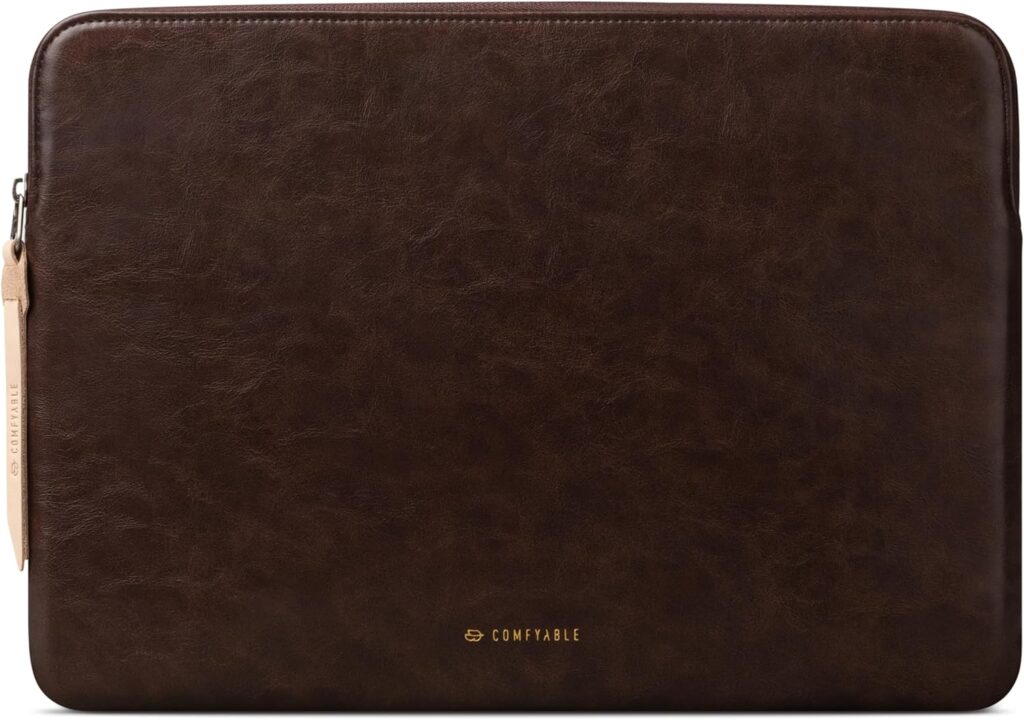
The most style-forward option in this roundup — with some important caveats.
The Comfyable Leather Sleeve occupies a specific niche: buyers who want a premium-looking leather MacBook Pro sleeve without committing to a three-figure price point. It delivers convincingly on the aesthetic side, and competently — if not exceptionally — on the protection side.
Key Specifications
- Compatible sizes: 13″, 14″, 16″ MacBook Pro
- Material: PU leather exterior + microfiber interior
- Water resistance: Moderate — PU leather handles light moisture but not sustained exposure
- Accessory storage: Small front pocket (cards and slim accessories only)
- Weight: Approx. 0.50 lbs
- Available colors: Brown, Black, Dark Navy, Cognac
What We Like
- PU leather exterior creates a genuinely premium visual presentation at an accessible price
- Soft microfiber lining is gentle on MacBook surfaces with no scratching risk
- Ages with character rather than deteriorating rapidly like cheap synthetic alternatives
- The cognac colorway in particular looks exceptional with Space Black MacBook Pro
- Front pocket handles cards and small accessories cleanly
- Understated hardware and clean stitching hold up to close inspection
What We Don’t Like
- PU leather provides less structural impact protection than nylon or EVA alternatives
- Limited accessory storage — the front pocket is small by meaningful comparison
- True leather alternatives at this price point don’t exist — PU is a synthetic material
- Water resistance is moderate, not reliable in sustained rain
Why We Chose It
We want to be clear about what a leather MacBook sleeve actually is in most price ranges: it’s almost certainly PU leather, which is a synthetic material designed to look and feel like genuine leather while costing a fraction of the price. That’s not a criticism — PU leather has its own advantages, including more predictable quality control, lighter weight, and vegan credentials — but buyers expecting full-grain leather at $30–$45 should recalibrate their expectations.
Within PU leather options, the Comfyable is one of the better implementations we’ve encountered. The seams are even, the color options are considered, and the visual presentation is genuinely impressive for the price.
Where it earns its recommendation is specifically for buyers whose primary use case is professional appearance — not maximum protection. If you’re carrying a MacBook Pro to client presentations, creative pitches, or meetings where the accessories you use create an impression, the Comfyable delivers that impression at a price that makes sense.
For daily commuting with significant impact risk, we’d point you back to the Tomtoc Defender. For style-focused professional contexts with moderate carry risk, the Comfyable earns its place.
Ideal for: Style-conscious professionals, creative directors, buyers who want a polished leather aesthetic without premium leather pricing.
Long-term value: Reasonable. PU leather ages differently than genuine leather — it may peel or crack at stress points after 2+ years of heavy use. Light to moderate users will get significantly longer lifespan from this sleeve.
What Most MacBook Sleeve Guides Get Wrong
Most buying guides describe products. This section explains the things that actually matter — and that most buyers learn too late.
Thicker Doesn’t Always Mean Safer
There’s an intuitive logic to assuming a thicker sleeve offers more protection. In reality, protection quality depends on where the padding goes, not how much of it there is overall.
A sleeve with 8mm of uniform foam padding offers less meaningful drop protection than a sleeve with 4mm of general padding plus reinforced corner guards — because corners absorb impact in real-world accidents, not broad surfaces.
Look for targeted corner protection rather than overall thickness when evaluating protection claims.
Cheap Zippers Can Damage Expensive Laptops
This is one of the most commonly overlooked risks in budget sleeves. Low-quality zippers can:
- Leave metal scratches along the chassis edge during repeated opening and closing
- Snag on the sleeve fabric and create abrasion near the MacBook’s edge
- Corrode over time and deposit metal residue inside the sleeve
A recessed zipper design — where the zip mechanism sits inside a fabric channel rather than directly against the laptop — eliminates this risk. Always check zipper placement in sleeves before buying.
Corner Protection Matters More Than Most Buyers Realize
Apple’s own drop test data and user-reported damage patterns consistently show that corner impacts are the most common cause of MacBook structural damage. A laptop falling two feet onto a hard floor with corner contact can cause far more damage than a flat surface impact from twice the height.
Most sleeves provide zero specific corner protection. The ones that do — like the Tomtoc Defender Series — provide meaningfully better real-world protection than the foam thickness alone would suggest.
Leather Is Not Automatically More Protective
Leather (or PU leather) carries a premium association that makes many buyers assume it’s also more protective. This isn’t accurate.
Leather is a surface material. Its protective quality depends entirely on what’s underneath it — the foam density, the construction quality, and the structural rigidity of the sleeve overall. A leather sleeve with thin foam padding offers less impact protection than a neoprene sleeve with dense, well-distributed cushioning.
Choose a sleeve based on its protective engineering, not its outer material, if protection is your primary concern.
Water Resistance and Waterproofing Are Not the Same Thing
Most MacBook sleeves marketed as “water resistant” can handle a light splash or brief rain exposure. Almost none can handle submersion or sustained heavy rain.
True waterproofing requires sealed seams, waterproof zippers, and a rated IPX certification — features that almost no laptop sleeve in this category claims or delivers.
For travel in wet environments or outdoor use, water-resistant is adequate for most scenarios. Just don’t mistake it for waterproofing.
Many Sleeves Fit Poorly Despite Claiming Compatibility
Generic sizing — like “fits laptops up to 15 inches” — often results in sleeves that fit a 14″ MacBook Pro loosely. A MacBook that shifts inside its sleeve during transit is at greater impact risk than one in a snug-fitting sleeve, because impact force isn’t distributed evenly when the laptop has room to move.
Always look for sleeves specifically sized for MacBook Pro 14″ or MacBook Pro 16″ rather than generic size claims.
An Oversized Sleeve Reduces Protection
Counterintuitively, a sleeve that’s too large provides less protection than a properly fitted one. Slack in the sleeve means the MacBook can move freely inside, creating impact scenarios during every use. The sleeve’s padding absorbs impact best when it’s in constant contact with the laptop surface it’s protecting.
How MacBook Owners Actually Choose a Sleeve
After years of personal use and conversations with other MacBook owners across different professional contexts, here’s how the decision actually plays out in practice.
Protection Is the First Filter, but Not the Only One
Most buyers say protection is their top priority. In practice, many then choose a sleeve based on aesthetics or price. The buyers who end up happiest are the ones who honestly assess their actual use scenario.
Ask yourself: where is the most likely place my MacBook experiences impact risk? If it’s inside a bag with other heavy items, corner protection matters most. If it’s on a desk and only occasionally carried, basic scratch protection may be all you need.
Weight Affects Daily Behavior More Than Buyers Expect
A sleeve that adds 0.6 lbs to a 3.5 lb MacBook Pro 14″ is adding 17% to the carry weight. Over a full commute day, that accumulates. Many buyers who prioritize maximum protection end up reaching for lighter carry options once they experience the daily weight reality.
This is why the Tomtoc Defender’s balance of serious protection at modest weight is so compelling: it doesn’t force you to choose between protecting your MacBook and carrying it comfortably.
Accessory Storage Changes Daily Routines
Buyers who’ve used sleeves with accessory storage almost never go back to storage-less alternatives. Having a charger, cable, and hub in the sleeve with the MacBook means less time packing and unpacking across multiple bags, and a natural single-item carry for shorter trips.
Professional Appearance Matters More in Some Contexts Than Others
For buyers working in creative agencies, design studios, or client-facing professional services, the visual coherence of their MacBook carry setup contributes to professional credibility. The sleeve is part of the impression.
For students, remote workers, and buyers who primarily use their MacBook alone, this factor is far less relevant — and shouldn’t inflate the budget toward premium aesthetics they won’t benefit from.
Which MacBook Pro Sleeve Fits Your Lifestyle?
Students
Best choice: MOSISO Laptop Sleeve
Students need reliable everyday scratch and bump protection, minimal added weight, and easy identification in a bag. The MOSISO delivers all three at a price that leaves budget for everything else a student needs.
Business Professionals
Best choice: Native Union Stow Lite Sleeve
Clean visual presentation, precise fit, organized accessory storage, and professional appearance across all environments make the Stow Lite the natural choice for business contexts.
Frequent Travelers
Best choice: MOFT Carry Sleeve
The integrated stand function, water-resistant exterior, and structural rigidity make the MOFT specifically better than other sleeves in the complex, unpredictable environments that travel creates.
Digital Nomads
Best choice: Tomtoc Defender Series
Digital nomads need maximum versatility: strong protection, reliable water resistance, practical accessory storage, and durability across climates. The Tomtoc Defender handles every scenario competently.
Remote Workers
Best choice: Bellroy Laptop Sleeve
Remote workers who move between home, coffee shops, and co-working spaces benefit from the Bellroy’s cable organization, premium feel, and DWR water repellency without needing the extreme protection of a travel-focused sleeve.
Creative Professionals
Best choice: Bellroy or Native Union Stow Lite
The visual quality and premium materials of both options align with the standards creative professionals hold in their equipment choices. The Bellroy’s recycled material tells a sustainability story; the Stow Lite’s minimal design communicates precision.
Minimalists
Best choice: Native Union Stow Lite Sleeve
Precise fit, controlled color palette, minimal external design, and no unnecessary bulk make the Stow Lite the natural choice for buyers who want less, not more, in their carry setup.
MacBook Sleeve vs MacBook Case: Which Should You Choose?
This is one of the most common questions new MacBook Pro owners ask, and the answer depends entirely on how you use your machine.
What’s the Difference?
A MacBook sleeve is a standalone pouch that stores your MacBook during transport. You remove the MacBook from the sleeve before use. Sleeves provide protection primarily during carry.
A MacBook hard shell case (or snap-on case) attaches directly to the MacBook and remains in place during use. It protects the surface during both carry and active use.
Sleeve Advantages
- Lighter and slimmer overall carry profile
- Better protection during transport (thicker padding, often better corner protection)
- No heat retention issues — sleeves don’t affect MacBook thermals
- More material variety and design options
- Lower price points at equivalent quality
Case Advantages
- Protects the MacBook surface during active use, not just transport
- Drops are protected even when the MacBook is on a desk
- No separate step to pack and unpack during carry
- Easier to combine with other bag carry options
Sleeve Disadvantages
- No protection once the MacBook is removed from the sleeve
- An extra step during setup and breakdown
- Won’t fit inside some sleek laptop bags once the MacBook is sleeved
Case Disadvantages
- Can affect MacBook thermals at high load (plastic shell reduces airflow)
- Adds more permanent weight and bulk to the MacBook itself
- Some hard cases develop flex creaks over time
- Less padding than a dedicated sleeve — impact absorption is lower
When Combining Both Makes Sense
Many experienced MacBook users combine a slim hard shell with a padded carrying sleeve. The hard shell provides constant surface protection and visual identity; the sleeve provides serious transit protection in a bag. For buyers carrying a MacBook through genuinely high-risk environments — construction sites, trade shows, rugged travel — this combination is worth the added cost and weight.
How to Choose the Best MacBook Pro Sleeve: Complete Buying Guide
Protection Level
Define your actual risk environment before evaluating protection claims:
- Daily desk-to-coffee-shop carry: Basic padding + scratch protection
- University or commuting: Corner protection + water resistance
- Frequent travel: Structural rigidity + heavy padding + water resistance
- High-impact environments: Maximum protection + corner guards + structural EVA
Corner Protection
Look specifically for corner-reinforced construction rather than uniform padding. Corners absorb the vast majority of real-world impacts.
Material Types
Leather / PU Leather: Premium aesthetics, moderate protection, style-forward. Genuine leather is rare at affordable price points — most “leather” sleeves are PU.
Neoprene: Lightweight, scratch-protective, flexible, affordable. Better for everyday scratch prevention than serious impact protection.
EVA (Ethylene Vinyl Acetate): Rigid, lightweight, good structural protection. Often used in combination with fabric exteriors.
Fabric / Woven: Durable, breathable, wide aesthetic range. Protection quality depends heavily on what’s underneath the fabric.
Felt: Extremely gentle interior material, excellent for scratch prevention. Limited structural protection.
Water Resistance
- Splash-resistant: Light rain and accidental spills
- Water-repellent (DWR): Moderate rain exposure, surface moisture
- Waterproof: Sustained water exposure (rare in laptop sleeves, usually requires IPX certification)
Most buyers need splash-resistant or water-repellent — true waterproofing isn’t necessary for typical use scenarios.
Zipper Design
- Recessed zippers: preferred — metal teeth don’t contact the MacBook chassis
- External zippers: check that the pull tab can’t scratch the laptop during operation
- Magnetic closures: convenient but provide less security during heavy carry
Accessory Storage
Evaluate based on what you actually carry:
- Charger + cable: Needs a pocket at least 6″ x 4″ deep
- Hub + cables + cards: Front accessory pocket with internal organization
- Card and slim accessories only: Any pocket works
Travel Friendliness
Travel-specific requirements include structural rigidity (overhead bin resistance), TSA-friendly carry (some airports require sleeve removal from bag for screening), and water resistance for variable weather.
Weight
- Budget sleeves: 0.3–0.5 lbs
- Standard protective sleeves: 0.5–0.7 lbs
- Travel-optimized sleeves with added function: 0.6–0.9 lbs
Weigh this against your total daily carry. Every ounce adds up across a full day.
14-Inch vs 16-Inch MacBook Pro Compatibility
The 14-inch and 16-inch MacBook Pro have meaningfully different dimensions:
- MacBook Pro 14″: 12.31 x 8.71 x 0.61 inches
- MacBook Pro 16″: 14.01 x 9.77 x 0.66 inches
Always purchase a sleeve specifically sized for your MacBook model rather than a generic “up to 15-inch” or “up to 16-inch” claim. Generic sizing often results in poor fit on MacBook Pro’s specific dimensions.
Long-Term Durability
Materials ranked by general durability:
- Ballistic nylon (most durable)
- Woven polyester / recycled fabric
- PU leather
- Standard neoprene
- Felt (most delicate)
Value for Money
The best value isn’t the cheapest sleeve — it’s the sleeve that provides the protection your specific MacBook needs for the longest time at a reasonable cost. A $40 sleeve that lasts three years and protects your $2,000+ MacBook correctly outperforms a $15 sleeve replaced annually.
Frequently Asked Questions
What is the best MacBook Pro sleeve?
The Tomtoc Defender Series is our top overall recommendation for most buyers. It offers the best combination of genuine corner protection, water resistance, accessory storage, and long-term durability at a price that doesn’t require a premium budget.
Do I need a sleeve for my MacBook Pro?
Yes, for most users. MacBook Pro’s aluminum chassis scratches easily, and the display glass is vulnerable to pressure and impact damage during carry. A sleeve prevents the surface damage that accumulates invisibly until it affects resale value, and provides meaningful impact protection for accidental drops in a bag.
Is a sleeve better than a hard shell case?
For transit protection, yes. Sleeves offer more padding and better impact absorption during carry than hard shell cases. For continuous surface protection during use, a case wins. Many experienced MacBook users combine a slim case with a carrying sleeve for both contexts.
Can a sleeve protect against drops?
Against moderate drops, yes — particularly if the sleeve has dedicated corner guards. Against severe impacts onto hard surfaces, no sleeve guarantees protection. The Tomtoc Defender Series offers the best drop protection in this roundup due to its 360° CornerArmor construction.
What size sleeve fits a 14-inch MacBook Pro?
The 14-inch MacBook Pro measures 12.31 x 8.71 x 0.61 inches. Look for sleeves specifically sized for “MacBook Pro 14-inch” or “13–14 inch” with precise dimensions to ensure a snug fit.
What size sleeve fits a 16-inch MacBook Pro?
The 16-inch MacBook Pro measures 14.01 x 9.77 x 0.66 inches. Look for sleeves specifically sized for “MacBook Pro 16-inch” rather than generic large laptop sizing, which often results in poor fit.
Are leather MacBook sleeves worth it?
That depends on what you’re optimizing for. If visual presentation and aesthetics are important — professional contexts, client meetings, creative environments — a leather or PU leather sleeve adds credibility and style that nylon alternatives can’t replicate. If maximum protection is the goal, leather’s appeal is aesthetic rather than functional.
Do MacBook sleeves prevent scratches?
Yes. This is one of the most straightforward benefits any quality sleeve provides. A soft interior lining — particularly microfiber or suede-like materials — prevents the surface contact scratching that occurs when a MacBook slides against other objects in a bag.
What is the most protective MacBook sleeve?
The Tomtoc Defender Series offers the best protection in this roundup, specifically due to its 360° CornerArmor construction, sealed zipper design, and thick EVA padding. For buyers who need maximum protection, combining the Tomtoc sleeve with a slim hard shell case provides the most comprehensive protection available.
Can I carry chargers and accessories inside a sleeve?
Only in sleeves with dedicated accessory pockets. Never store a charger or accessories loose inside a sleeve alongside the MacBook — contact between accessories and the laptop surface causes exactly the scratches the sleeve is designed to prevent. The Tomtoc Defender, Native Union Stow Lite, Bellroy, and MOFT Carry Sleeve all include dedicated separate pockets for accessories.
Are MacBook sleeves waterproof?
No MacBook sleeve in this roundup is fully waterproof. Most are water-resistant — designed to handle light rain, splashes, and brief moisture exposure. For extended wet weather exposure, a fully weatherproof bag with waterproof lining provides better protection than any laptop sleeve alone.
How long does a quality MacBook sleeve last?
Budget neoprene sleeves typically last 12–24 months of daily use before showing significant wear. Quality fabric and ballistic nylon sleeves can last 3–5 years. Premium options like the Bellroy, backed by a 3-year warranty, are designed for extended ownership lifespans.
Final Verdict: Which MacBook Pro Sleeve Should You Buy?
After extensive daily use across different MacBook models, carry contexts, and user scenarios, here’s where we land:
Best Overall: Tomtoc Defender Series — The most practical, well-rounded sleeve for the broadest range of MacBook Pro users. Serious protection, smart organization, daily usability. This is the one we’d buy.
Best Budget: MOSISO Laptop Sleeve — Reliable everyday scratch and bump protection at a price that respects the reality of student and casual budgets.
Best Premium: Bellroy Laptop Sleeve — The premium sleeve that earns its price through material quality, cable organization, water repellency, and a 3-year warranty.
Best Professional: Native Union Stow Lite Sleeve — Minimal, precise, organized, and visually credible in every professional environment.
Best Travel: MOFT Carry Sleeve — The only sleeve in this roundup that addresses the specific challenges of working in transit with an integrated stand function and travel-ready structure.
Best Leather: Comfyable Leather Sleeve — Premium PU leather aesthetics at an accessible price, with the honest caveat that style is its primary strength over protection.
The right MacBook Pro sleeve isn’t necessarily the most expensive or the most padded. It’s the one that matches how you actually use your machine. Spend a few minutes with the lifestyle matching section above, identify your real use scenario, and buy accordingly. Your MacBook will thank you.
Related Articles
MacBook Neo Sleeve Guide — An in-depth look at neo sleeve construction, what distinguishes them from standard neoprene, and which options perform best for daily carry.
Best Laptop Sleeve for Travel — A dedicated travel-focused roundup covering water resistance, TSA compatibility, structural protection, and the best carry options for frequent flyers.
Best MacBook Accessories — The complete 2026 guide to MacBook Pro accessories worth buying: hubs, stands, keyboards, and the peripherals that genuinely improve daily use.
Best Desk Setup Accessories — Building a MacBook-centered work setup that’s efficient, ergonomic, and worth spending money on.
MacBook Pro Accessories Guide — A curated, experience-driven guide to the accessories that complement a MacBook Pro across every use context, from home office to travel kit.
Prices and availability are subject to change. All Amazon links are affiliate links. We may earn a commission at no additional cost to you if you purchase through our links.








