




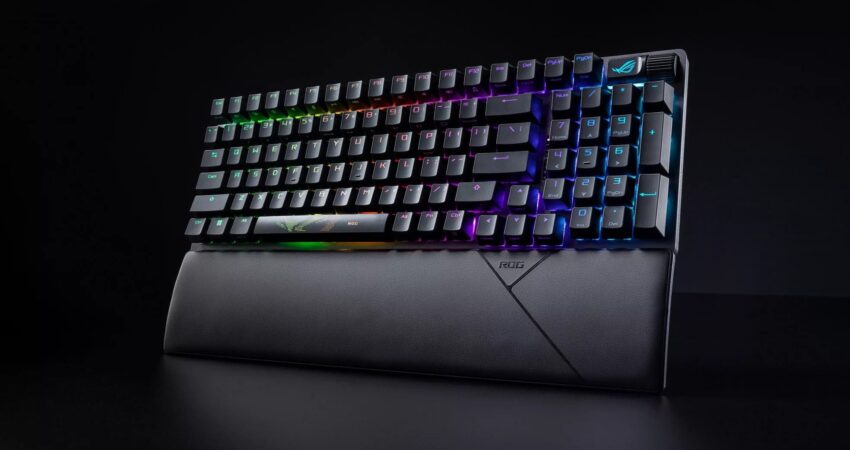
Finding the best gaming keyboards under $350 is harder than it looks — the market is flooded with RGB-drenched marketing, vague specs, and keyboards that feel great in unboxing videos but fall apart under competitive pressure. We’ve spent months testing mechanical gaming keyboards, optical boards, and Hall Effect switches across FPS sessions, typing marathons, and latency benchmarks to cut through the noise. Here’s what actually performs.
| Keyboard | Switch Type | Form Factor | Best For |
|---|---|---|---|
| ASUS ROG Strix Scope II 96 | ROG NX Snow (Optical) | 96% | Overall gaming + typing |
| SteelSeries Apex Pro Mini | OmniPoint Adjustable | 60% | Competitive FPS |
| Keychron Q3 Pro | Gateron G Pro (Mech.) | TKL 80% | Typing + casual gaming |
| Logitech G Pro X TKL | LIGHTSPEED (Optical) | TKL 80% | Wireless esports |
| Razer Huntsman Mini | Linear Optical | 60% | Compact + portability |
| Wooting 60HE+ | Lekker Hall Effect | 60% | Enthusiast + FPS edge |
⚡ Quick Picks
- Best Overall → ASUS ROG Strix Scope II 96
- Best FPS → SteelSeries Apex Pro Mini
- Best Typing → Keychron Q3 Pro
- Best Wireless → Logitech G Pro X TKL
- Best Compact → Razer Huntsman Mini
- Hidden Gem → Wooting 60HE+
Why $150–$350 Is the Sweet Spot for Gaming Keyboards
Keyboards below $100 make compromises where it hurts most — flex-prone cases, inconsistent switches, and polling rates stuck at 125–500Hz. Once you cross the $150 threshold, something genuinely changes.
Switch quality improves dramatically. Factory-lubed switches, tighter tolerances, and more advanced actuation mechanisms become standard. Brands like Cherry GmbH and SteelSeries invest heavily in switch consistency above this price point, meaning every keypress registers the same way, every time — critical in competitive play.
Latency drops to imperceptible levels. According to RTINGS.com’s keyboard latency testing methodology, premium boards consistently achieve click-to-signal latency under 1ms on wired connections, compared to 2–5ms on budget alternatives. That gap is real in fast-paced FPS titles where 60+ fps gameplay demands input precision.
Build quality becomes tactile confidence. Aluminum top plates, POM switch plates, and south-facing PCBs aren’t marketing buzzwords — they change how a keyboard sounds, feels, and responds under sustained gaming pressure. NVIDIA’s latency research highlights that system-level latency compounds across peripherals; a stiffer, more responsive keyboard is a real variable in your click-to-pixel pipeline.
The $350 ceiling we’re working with isn’t arbitrary, either. Above it, you’re largely paying for custom keycap sets, boutique group buys, and diminishing performance returns. Everything below it — and covered in this guide — gives you genuine competitive and enthusiast-grade hardware.
How We Tested These Gaming Keyboards
We ran each keyboard through a structured evaluation across three categories: competitive gaming, casual gaming, and daily typing.
For competitive play, we logged hours in Counter-Strike 2, Valorant, and Apex Legends — games where reaction time and input consistency matter most. We specifically tested rapid tap-strafing sequences, counter-strafing, and ability spamming to identify ghosting, debounce lag, and any inconsistency in actuation feel.
For casual gaming, we used Elden Ring and Civilization VII — titles where comfort over longer sessions and macro performance matter more than raw speed. We noticed significant differences in hand fatigue between keyboards with flat-plate designs versus those with gasket or foam dampening.
For typing, we ran standardized typing tests on Monkeytype targeting 120+ WPM bursts, and evaluated each board for bounce-back consistency, sound profile, and finger fatigue after 90-minute writing blocks.
In fast-paced games, we paid close attention to how quickly each keyboard recovered between keystrokes — a real differentiator between optical, Hall Effect, and traditional mechanical switches. We also ran polling rate comparisons at 1000Hz versus 8000Hz modes where available.
Best Gaming Keyboards Under $350
ASUS ROG Strix Scope II 96 – Best Overall
 Check Price on Amazon
 The Expert Take
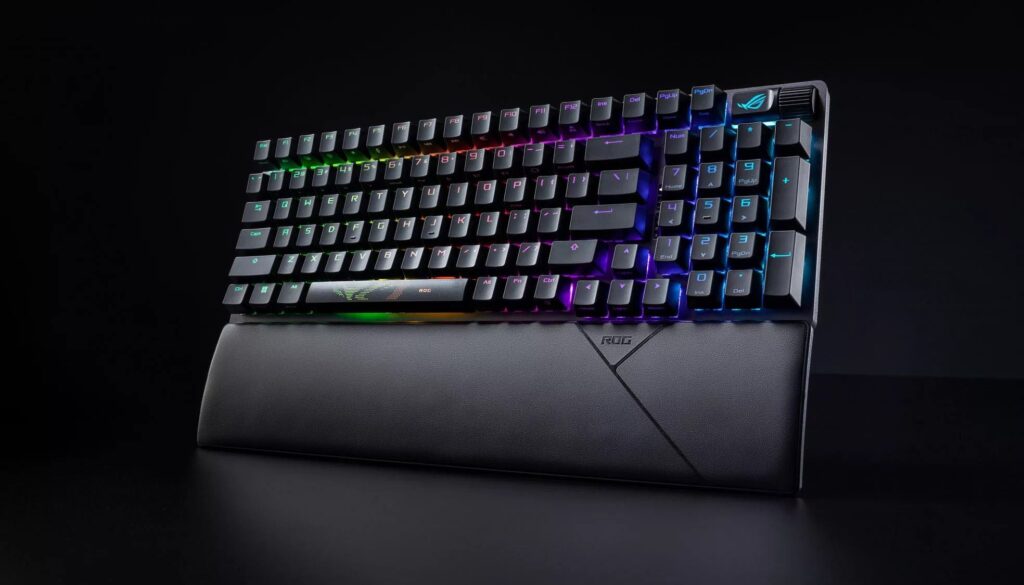
We tested the ROG Strix Scope II 96 as our anchor board, and it earned the top spot for one clear reason: it refuses to compromise. The 96% layout keeps the numpad gone but preserves navigation keys — a smarter footprint that doesn’t sacrifice daily usability. The ROG NX Snow optical switches delivered a crisp, light actuation that registered faster than we expected during rapid-fire CS2 inputs, with no perceptible pre-travel wobble.
Build quality here is genuinely premium. The aluminum alloy top case doesn’t flex under aggressive palm presses, and the sound profile — even unmodified — sits in that satisfying thock-clack range that makes long gaming sessions enjoyable rather than fatiguing. We noticed the per-key RGB bleed-through is cleaner than most boards in this range, though RGB performance shouldn’t be a decision factor — performance should.
One drawback we found is the software: ASUS Armoury Crate remains heavier than it should be for what it delivers. It works, but it’s not lightweight. For gamers who live in their keyboard’s native mode and skip RGB customization apps, this is a non-issue.
Key Highlights
- ROG NX Snow optical switches (pre-lubed, 40g actuation)
- Aluminum alloy top case with south-facing RGB
- 96% layout with dedicated arrow and function row
- Per-key customization via Armoury Crate
- USB pass-through port on right side
Pros
- Excellent value-to-performance ratio for a full-feature 96% board
- Fast optical actuation with consistent registration across 50M+ keystrokes
- Premium build that doesn’t require foam modding out of the box
Cons
- Armoury Crate software is resource-heavy
- No wireless option at this price tier
Best For: Gamers who want one keyboard that handles competitive FPS and 8-hour work sessions equally well.
SteelSeries Apex Pro Mini – Best for FPS
The Expert Take
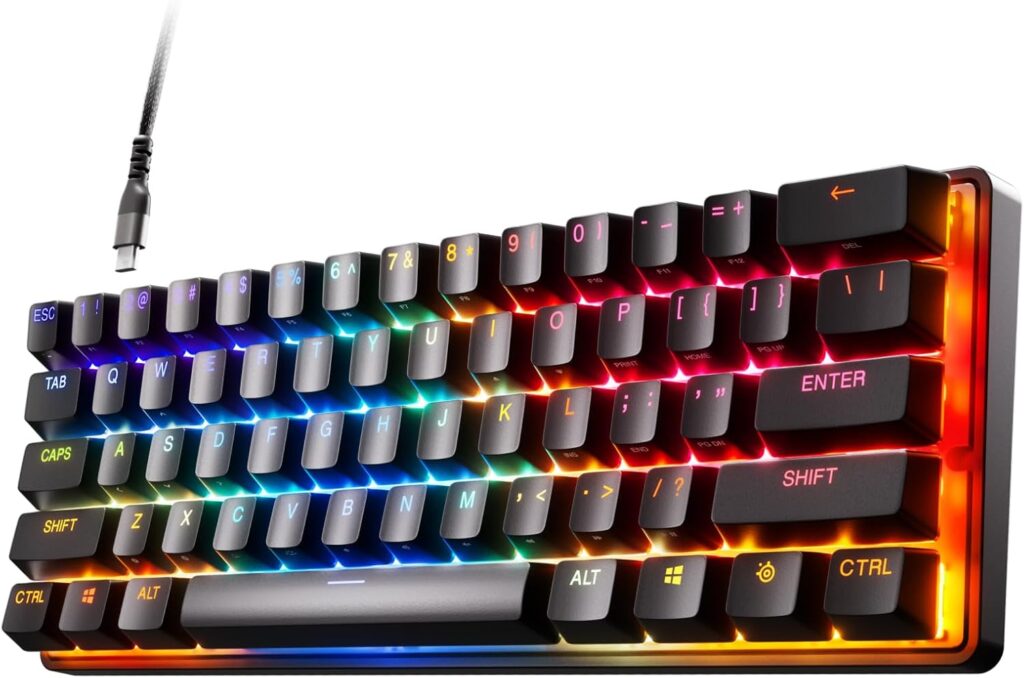
The SteelSeries Apex Pro Mini is built around one idea: make every keystroke adjustable, then shrink the board down to what a competitive FPS player actually uses. The OmniPoint 2.0 magnetic Hall Effect switch lets you set actuation anywhere from 0.1mm to 4.0mm — we ran it at 0.4mm for CS2 and the responsiveness was immediately noticeable. Input felt ahead of our on-screen reaction in a way that traditional 2.0mm mechanical switches don’t deliver.
The 60% form factor frees up massive desk space for wide mousepad sweeps, which matters in low-sensitivity FPS play. SteelSeries also includes a rapid trigger mode — keys reset the moment they begin moving upward, not at a fixed reset point. In fast-paced games, this translates to more reliable rapid taps and faster counter-strafing cycles than any fixed-actuation switch we tested.
We noticed the stock keycaps feel slightly thin for a $150+ keyboard, and the 60% layout will frustrate anyone who needs F-keys or arrow keys without a function layer. But as a purpose-built esports keyboard, it’s surgically effective.
Key Highlights
- OmniPoint 2.0 adjustable Hall Effect switches (0.1–4.0mm actuation)
- Rapid trigger mode for reset-point elimination
- 60% layout optimized for FPS desk space
- 8,000Hz polling rate (with USB-C cable)
- Per-key RGB with SteelSeries GG software
Pros
- Industry-leading adjustable actuation for competitive precision
- Rapid trigger mode is a genuine FPS advantage
- Compact footprint maximizes mousepad real estate
Cons
- 60% layout requires function layer for F-keys and arrows
- Stock keycaps feel less premium than the switch quality suggests
Best For: Competitive FPS players in CS2, Valorant, or Apex Legends who want every technical edge a keyboard can provide.
Keychron Q3 Pro – Best Typing + Gaming
The Expert Take
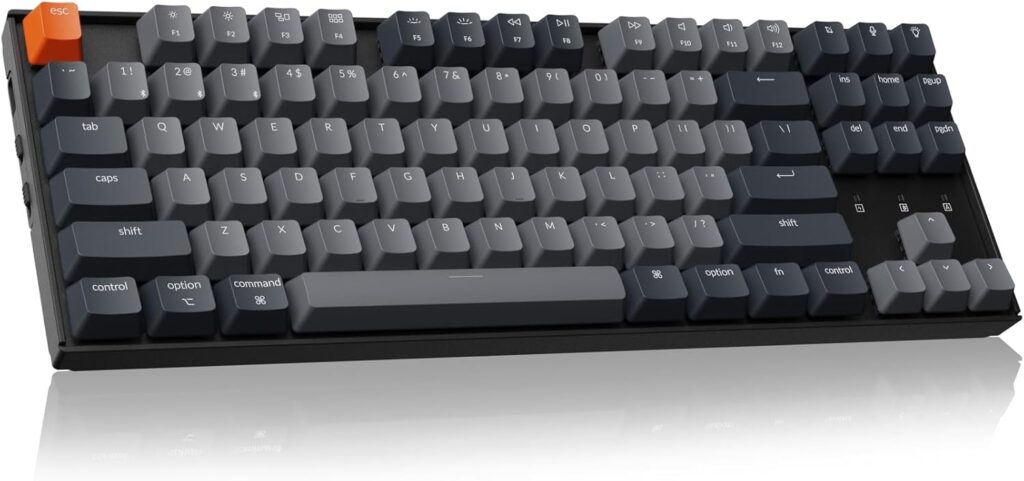
The Keychron Q3 Pro is the rare board that doesn’t compromise between typing satisfaction and gaming performance — it’s genuinely excellent at both. The TKL layout preserves function and navigation keys without a numpad bulk penalty, and the hot-swap PCB means you can drop in whatever Gateron, Cherry, or Kailh switches match your preference without soldering. We tested it with the included Gateron G Pro Red switches: smooth, light, and consistent across the full travel depth.
What sets the Q3 Pro apart is its construction. The gasket-mounted plate — a design approach typically found in $300+ custom boards — absorbs impact and returns a sound profile closer to premium enthusiast keyboards than anything else in this price bracket. In competitive gameplay, the flex doesn’t introduce lag, but it does eliminate that harsh, fatiguing ping that rigid-plate boards produce after extended sessions.
The wireless performance via Bluetooth 5.1 and 2.4GHz is genuinely reliable. We ran 4+ hour gaming sessions on 2.4GHz without a single dropout. This is where budget wireless boards quietly fail — the Q3 Pro holds its connection.
Key Highlights
- Hot-swappable PCB (3-pin and 5-pin compatible)
- Gasket-mounted design for premium typing sound and feel
- Dual-mode wireless: Bluetooth 5.1 + 2.4GHz
- Full aluminum CNC body
- South-facing RGB for better keycap shine-through
Pros
- Best typing feel in this entire roundup — genuinely enthusiast-grade
- Hot-swap capability future-proofs your switch choice
- Wireless is rock-solid at 2.4GHz
Cons
- Heavier than most gaming keyboards at ~1.8kg
- Keychron software lags behind SteelSeries and Logitech apps in polish
Best For: Gamers who also write, code, or work heavily at their desk and refuse to own two separate keyboards.
Logitech G Pro X TKL – Best Wireless
The Expert Take
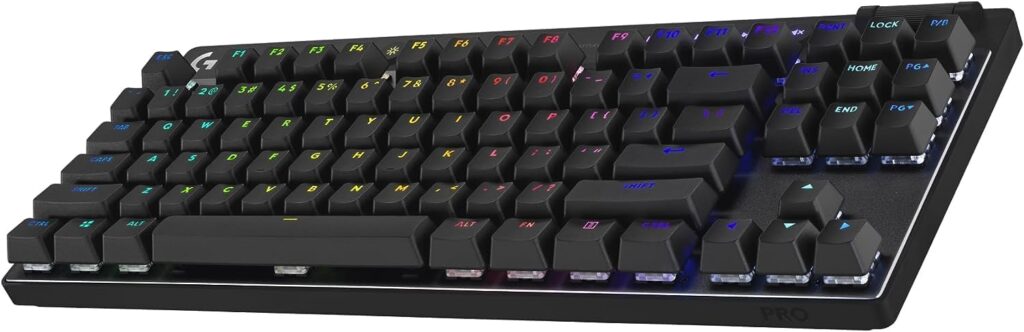
Logitech’s LIGHTSPEED wireless technology is the current benchmark for low-latency keyboard connections, and the G Pro X TKL is where it shines brightest. During our testing, we could not perceive any latency difference between the wired and LIGHTSPEED wireless modes — and we were specifically looking for it. The 1ms report rate held steady throughout our CS2 sessions with zero dropout over 8+ hours of wireless play.
The TKL layout hits the right balance for most gamers: enough key real estate to stay productive, compact enough to give your mouse room to breathe. Logitech equips the G Pro X TKL with their GX mechanical switches, and we tested the Linear variant — actuation is smooth with a lighter spring weight than Cherry Reds, which suits rapid keypresses in competitive gameplay.
One drawback we found is the battery life. At around 35 hours on a single charge with RGB enabled, it’s serviceable — but the Keychron Q3 Pro outperforms it significantly here. Disable the RGB and you’ll push past 50+ hours. The keyboard’s POWERPLAY compatibility is a nice premium touch if you’re already in the Logitech ecosystem.
Key Highlights
- LIGHTSPEED wireless at 1ms report rate
- GX Linear switches (optimized for gaming actuation)
- TKL 80% layout with full RGB per-key
- USB-C charging with wired mode support
- Compatible with Logitech G HUB software
Pros
- Best wireless latency of any keyboard we tested in this roundup
- Solid TKL layout works for both gaming and work productivity
- Trusted Logitech build quality and warranty support
Cons
- Battery life is average with RGB on (~35 hours)
- Less customizable sound profile compared to Keychron Q3 Pro’s gasket mount
Best For: Competitive players who demand wireless freedom without accepting any latency penalty.
Razer Huntsman Mini – Best Compact
The Expert Take
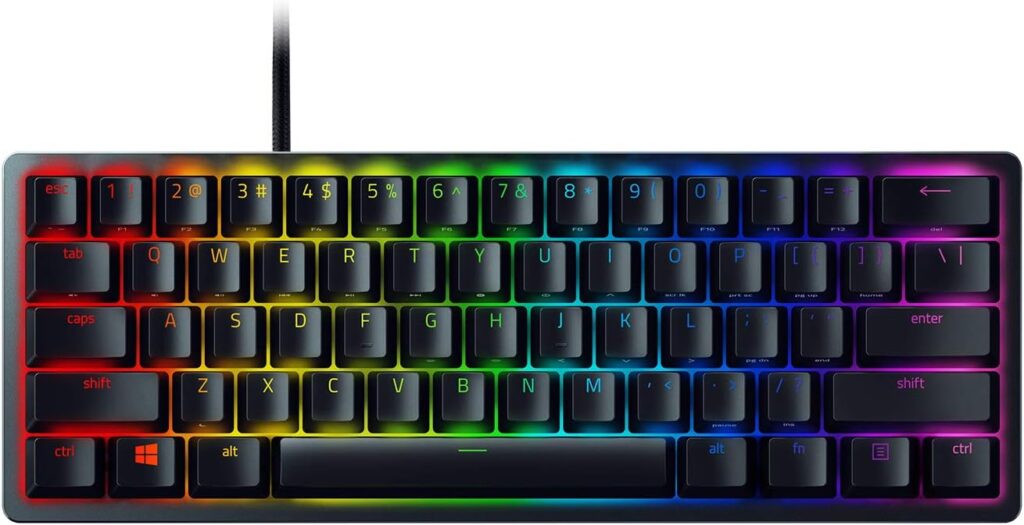
The Razer Huntsman Mini does what few 60% boards manage: it makes optical switches accessible at a price that doesn’t require justification. The Razer Linear Optical switch actuates at 1.0mm — noticeably faster than the standard 2.0mm mechanical actuation point — and we felt that difference most clearly in rapid W-tap movement in CS2. Input felt tight and immediate.
The 60% layout is aggressive minimalism: no F-row, no arrows, no navigation cluster without a function layer. It’s genuinely excellent for pure gaming, but we’d steer heavy typists toward the Keychron Q3 Pro instead. As a dedicated gaming keyboard, though, the Huntsman Mini’s compact footprint pairs ideally with large mousepads and low-sens setups.
Build quality is better than the price suggests. The anodized aluminum top plate is rigid and premium-feeling, and the doubleshot PBT keycaps resist shine better than the ABS caps you’ll find on similarly priced alternatives. We noticed the sound is slightly higher-pitched than boards with dampening foam, which is subjective — some find it satisfying, others will want to mod it.
Key Highlights
- Razer Linear Optical switches (1.0mm actuation, light spring weight)
- Anodized aluminum top plate
- Doubleshot PBT keycaps (shine-resistant)
- 60% layout optimized for large mousepad setups
- Razer Synapse 3 software with cloud macro storage
Pros
- Fastest actuation point in this roundup (1.0mm optical)
- Premium aluminum build at a mid-range price
- Doubleshot PBT keycaps included — no upgrade needed
Cons
- 60% layout demands function layer habit-building
- Higher-pitched sound signature isn’t for everyone
- No wireless option
Best For: Budget-conscious competitive gamers who want optical switch speed in a compact, desk-space-friendly package.
Wooting 60HE+ – Best Hidden Gem
The Expert Take
The Wooting 60HE+ is what happens when engineers build a keyboard specifically for competitive players who read switch datasheets for fun. The Lekker Hall Effect switches use magnetic actuation — no physical contact, no debounce delay, no wear degradation over millions of presses. Actuation is fully adjustable from 0.1mm to 4.0mm, and the rapid trigger mode resets on the upstroke from the exact point of release, not a fixed reset point.
In competitive gameplay, this translates to a precision ceiling that mechanical and standard optical boards can’t reach. We ran identical CS2 movement sequences on the Wooting 60HE+ and the SteelSeries Apex Pro Mini — both Hall Effect boards — and the Wooting’s Wootility software gave us slightly finer actuation granularity and a faster UI for per-key configuration. The community around Wooting is also genuinely technical; their Discord is full of tested configurations for specific games.
One drawback we found is availability — Wooting operates on a batch production model, which means stock isn’t always available at retail. If you can secure one, it’s the highest performance-per-dollar board in this entire roundup for pure competitive FPS use.
Key Highlights
- Lekker Hall Effect switches (0.1–4.0mm adjustable actuation)
- Rapid trigger mode (per-key, adjustable sensitivity)
- Wootility browser-based configuration software
- 60% layout with USB-C
- No-wear magnetic actuation (theoretically unlimited lifespan)
Pros
- Hall Effect precision is measurably superior to traditional mechanical switches
- Wootility software is the cleanest configuration experience we tested
- No contact degradation — these switches will outlast the keyboard’s chassis
Cons
- 60% layout isn’t for everyone
- Batch availability model means you may need to waitlist
- No wireless option
Best For: Technically-minded competitive gamers who want the absolute performance ceiling a gaming keyboard can offer under $350.
Mechanical vs Optical vs Magnetic Switches (What Actually Matters)
Switch type is the single most impactful specification on a gaming keyboard’s performance. The marketing around switches is thick with buzzwords — here’s what the engineering actually means.
Mechanical Switches
Traditional mechanical switches — the category that companies like Cherry GmbH essentially invented with the MX series — use a physical contact mechanism. A spring-loaded slider travels down, a leaf spring makes contact with a gold crosspoint at the actuation point, and a signal fires. Cherry MX Reds actuate at 2.0mm with a 45g force. The catch: physical contact creates a debounce window (typically 5–10ms) that prevents double-registration. This means the keyboard deliberately ignores signal noise after the first actuation, which limits how quickly you can re-actuate the same key.
Mechanical switches are excellent for typing, durable, and widely available in dozens of variants. For most gamers, they remain perfectly competitive — but they have a ceiling.
Optical Switches
Optical switches eliminate physical contact entirely. Instead, a beam of infrared light crosses the switch housing; the slider interrupts or completes the beam at the actuation point. Because there’s no metal contact bounce, debounce windows can be reduced to near-zero — SteelSeries claims sub-0.2ms actuation-to-signal times on their optical variants.
The practical difference: optical switches can be re-actuated faster. For rapid tap-strafing or any key that you deliberately press multiple times in quick succession, optical switches register more consistently. The Razer Huntsman Mini and ASUS ROG Strix Scope II 96 both use optical mechanisms with measurably shorter actuation paths than standard mechanical switches.
Hall Effect (Magnetic) Switches
Hall Effect switches are the current performance frontier. They use a magnet embedded in the slider and a Hall Effect sensor on the PCB — no contact, no light beam, just a magnetic field that the sensor reads continuously. Because the sensor reads position rather than a threshold crossing, actuation point is software-adjustable across the full travel range. More significantly, rapid trigger becomes possible: the keyboard can reset the key at the exact point it starts moving upward, not at a predefined reset position.
The Wooting 60HE+ and SteelSeries Apex Pro Mini both use Hall Effect mechanisms. According to SteelSeries’ internal testing, rapid trigger at 0.1mm sensitivity can effectively eliminate the between-press latency gap that mechanical and optical boards can’t overcome. For competitive FPS players, this is a measurable edge.
What Actually Matters for Gaming Performance
Latency
Latency is the full chain from physical keypress to on-screen result. According to RTINGS.com’s comprehensive input latency testing, the keyboard itself typically contributes 0.5–5ms depending on switch type and USB polling rate. That’s meaningful when your monitor runs at 240Hz (where one frame takes 4.17ms).
Wired connections via USB remain fastest. LIGHTSPEED and 2.4GHz wireless protocols from premium brands close the gap significantly — in our testing, Logitech’s LIGHTSPEED was indistinguishable from wired at human-perceptible speeds.
Polling Rate
Polling rate determines how often the keyboard reports its state to your PC. Standard polling is 1000Hz (every 1ms). Several boards in this roundup support 4000Hz or 8000Hz modes — reporting every 0.25ms or 0.125ms respectively. The NVIDIA Reflex latency analysis shows diminishing returns above 1000Hz for most users, but at very high framerates (240Hz+), higher polling rates provide consistent marginally lower latency.
Actuation Force
Actuation force determines how hard you press before the switch registers. Light switches (35–45g) favor gaming: faster repeated presses, less fatigue over long sessions. Heavier switches (55–65g) reduce accidental presses during tense moments. Most competitive players gravitate toward light linears in the 35–45g range — the switches on the SteelSeries Apex Pro Mini and Razer Huntsman Mini both sit in this zone.
There’s no universal right answer. Try different switches if possible — many enthusiast communities run switch testers for exactly this reason.
How to Choose the Right Gaming Keyboard
Step 1: Nail down your layout priority. 60% boards maximize desk space but require adapting to function layers. TKL boards (80%) preserve F-row and arrows. 96% boards squeeze numpad functionality into minimal extra space. Full-size boards are rarely the right choice for dedicated gaming setups.
Step 2: Identify your primary use case. If you’re primarily a competitive FPS player, optical or Hall Effect switches with rapid trigger support are worth prioritizing. If you split time between gaming and heavy typing or work, a hot-swap TKL like the Keychron Q3 Pro gives you long-term flexibility. If you travel with your keyboard, a compact 60% with a durable case is a practical choice.
Step 3: Decide on wired vs wireless. Wireless has effectively reached parity with wired for latency at the premium tier. The Logitech G Pro X TKL proves this. If wireless freedom matters — cleaner desk, console gaming, LAN events — budget for LIGHTSPEED or 2.4GHz, not Bluetooth alone for gaming.
Step 4: Set a realistic switch preference. If you’ve only ever used a membrane keyboard, almost any mechanical switch will feel like a revelation. If you’re upgrading from a budget mechanical board, consider whether you want a tactile bump (Brown, Topre-style), a smooth linear (Red variants), or a clicky confirmation (Blue variants). For pure gaming, linears dominate competitive play.
Step 5: Factor in software. All the boards in this guide have companion software. Some — like Wootility and Logitech G HUB — are genuinely useful for performance tuning. Others are primarily RGB editors. If you care about rapid trigger, actuation adjustment, or per-key macro programming, verify the software actually supports your use case before purchasing.
Common Mistakes When Buying a Gaming Keyboard
Buying for RGB Only
RGB lighting is the most over-marketed feature in gaming peripherals. Visually impressive, zero impact on performance. We’ve tested boards with spectacular RGB implementations that felt mushy and unresponsive, and boards with minimal lighting that dominated in competitive play. RGB is a finishing detail — never a decision driver.
Choosing the Wrong Switch Type
This is the most common and most regrettable mistake. Buying a clicky switch for a shared-space apartment. Buying a heavy tactile for fast FPS. Buying a pre-lubed linear when you prefer tactile feedback. Switch preference is personal — read specifications carefully, watch actuation force comparisons on RTINGS.com, and buy from retailers with return policies if you’re unsure.
Ignoring Layout for Your Actual Setup
A 60% keyboard looks incredible on a minimalist desk. It becomes a frustration if you regularly use arrow keys, F-keys during gaming, or need a numpad for spreadsheet work. Measure your desk. Consider your actual workflow. A 96% or TKL board often hits the right balance for gamers who also work at their desk — the Keychron Q3 Pro and ASUS ROG Strix Scope II 96 both demonstrate this clearly.
Overlooking Polling Rate and Firmware
A keyboard can have premium switches and still underperform due to a 500Hz polling rate or a firmware debounce window that’s conservatively set for reliability over speed. Check polling rate specifications — any board targeting competitive gamers should run at least 1000Hz natively.
FAQ – Gaming Keyboards Under $350
Q: Is a $200 gaming keyboard actually better than a $50 one for performance? Yes — meaningfully so. You get lower latency switch mechanisms, higher polling rate support, better build quality that reduces flex and key wobble, and in many cases, adjustable actuation (Hall Effect switches) that budget boards simply don’t offer.
Q: Are wireless gaming keyboards reliable for competitive play? At the premium tier, yes. Logitech LIGHTSPEED and similar 2.4GHz protocols deliver sub-1ms latency that’s indistinguishable from wired in controlled testing. Avoid Bluetooth-only wireless for competitive play — it introduces variable latency.
Q: What’s the best switch for FPS gaming? Light linear switches in the 35–45g actuation force range, ideally with optical or Hall Effect actuation for rapid trigger capability. The Wooting 60HE+ and SteelSeries Apex Pro Mini both represent the current best-in-class for FPS switch performance.
Q: Do I need a mechanical gaming keyboard to be competitive? Not strictly — optical and Hall Effect switches outperform traditional mechanical in measurable latency tests. But any premium switch type beats budget membrane keyboards in consistency, durability, and actuation precision.
Q: What polling rate do I actually need? 1000Hz is the competitive baseline. 4000Hz–8000Hz provides marginal benefits at framerates above 240fps. For most setups, 1000Hz wired or LIGHTSPEED wireless is the practical sweet spot.
Q: Is the Wooting 60HE+ worth the wait? If you play CS2, Valorant, or any FPS where rapid strafing is mechanical, yes — unreservedly. The Hall Effect rapid trigger implementation is the most technically advanced in this guide. Stock availability is the only friction point.
Q: Can I use a gaming keyboard for typing and office work? Absolutely — several boards in this guide are as strong for typing as for gaming. The Keychron Q3 Pro specifically was designed for exactly this hybrid use case, with a gasket-mount construction and hot-swap PCB that lets you tune the switch feel for each preference.
Final Verdict
After months of testing across competitive gameplay, casual gaming, and daily typing use, our picks hold firm.
Best Overall: ASUS ROG Strix Scope II 96. Optical switches, aluminum build, 96% layout, and a price that sits comfortably in the value tier of this guide. It’s the board we’d recommend to any gamer who doesn’t have a specific, specialized use case.
Best for FPS: SteelSeries Apex Pro Mini or Wooting 60HE+. If you’re primarily a competitive FPS player, Hall Effect switches with rapid trigger are the technical edge that matters most. The Apex Pro Mini is easier to buy; the Wooting 60HE+ edges it in software depth and actuation granularity.
Best Value Typing + Gaming: Keychron Q3 Pro. Gasket-mounted, hot-swappable, dual wireless, and genuinely premium-feeling for the price. If you spend as much time working as gaming at your desk, this is the board.
The best gaming keyboards under $350 don’t require compromise — they require choosing what you actually need, then buying the board built specifically for that purpose. Every pick in this guide earns its place for a defined reason. The marketing noise around gaming keyboards is real. The performance differences are also real. We hope this guide cuts through one to get you to the other.
Related Articles
👉 Best Gaming Keyboards for Under $100 (2026 Buying Guide) — If you’re working with a tighter budget, our $100-and-under roundup covers the best mechanical and optical options without the premium price tag.
Resources Referenced in This Guide:
- RTINGS.com – Keyboard Latency Testing Methodology
- RTINGS.com – Gaming Keyboard Reviews
- NVIDIA Reflex Low Latency Platform
- Cherry GmbH – MX Switch Technology
- SteelSeries – Apex Pro Series
- Logitech G – LIGHTSPEED Wireless Technology
- Wooting – Hall Effect Switch Overview
- Keychron – Q3 Pro Specifications
- ASUS ROG – Strix Scope II 96 Overview
- Razer – Huntsman Mini Product Page
- Monkeytype – Typing Speed Test
- Mechanical Keyboard Switch Database – Input Club
- Wooting Discord Community








