




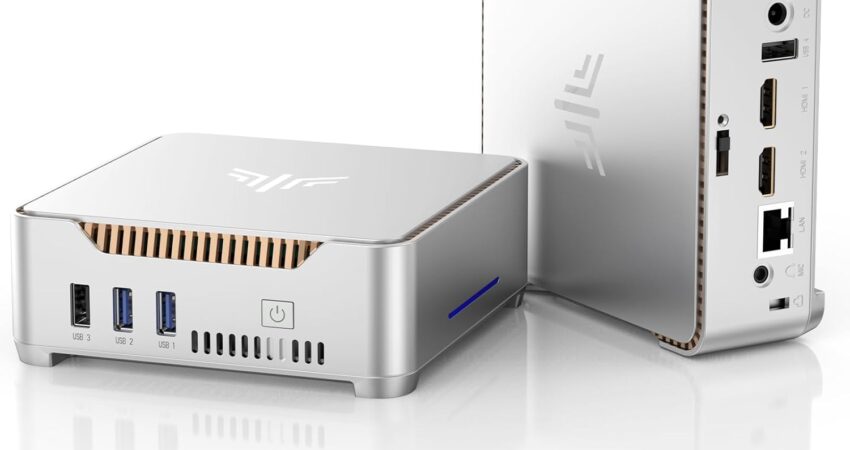
🎯 What You Need to Know About OpenClaw System Requirements
Selecting hardware that meets OpenClaw system requirements isn’t complicated—but the wrong choice will create performance bottlenecks that hamper your AI agent’s effectiveness. Autonomous agent operations require consistent computational resources, adequate memory throughput, and dependable storage speeds. Unlike standard computing applications, agent hosting necessitates continuous availability without performance degradation or thermal issues.
📊 Quick Comparison: Top 5 Mini PCs for OpenClaw
| 🏆 Mini PC Model | ⚙️ CPU Threads | 💾 RAM | 📀 Storage Type | ✅ Best For |
|---|---|---|---|---|
| GEEKOM A5 2025 | 8 threads | 16GB (up to 64GB) | 512GB NVMe | Production deployments |
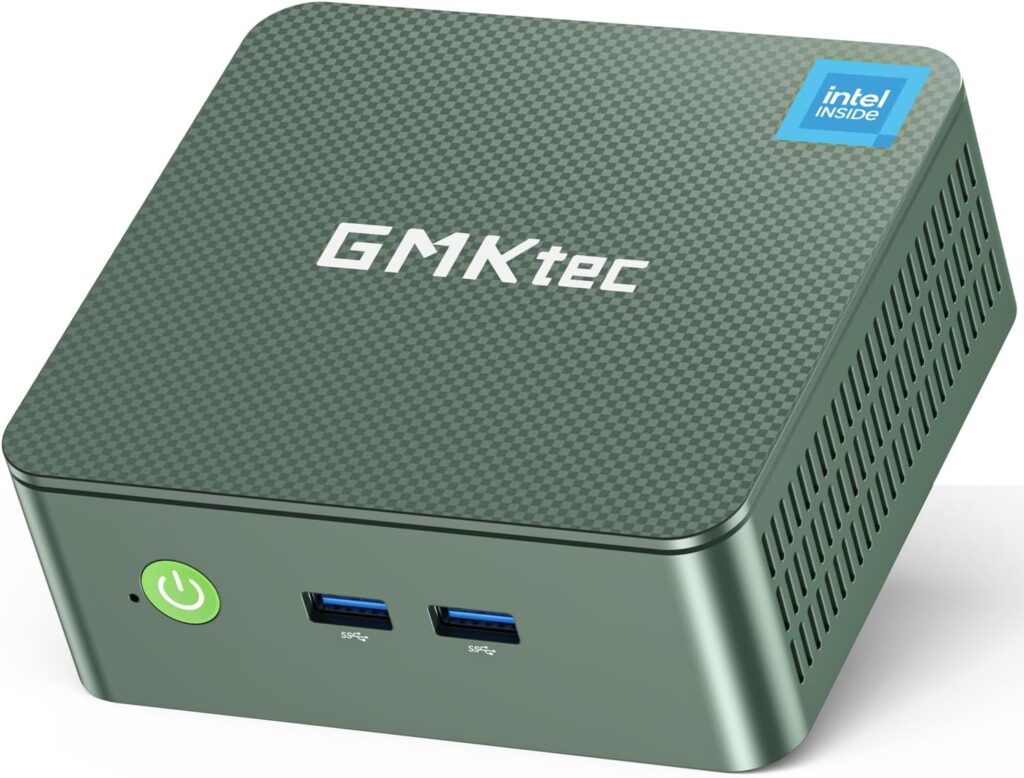
| GMKtec G3 Plus | 12 threads | 16GB | 512GB NVMe | Multi-agent workloads |
| Beelink MINI S13 | 12 threads | 16GB | 500GB NVMe PCIe 4.0 | Silent office environments |
| KAMRUI Mini PC | 4 threads | 16GB | 512GB PCIe | Budget single-agent testing |
| Intel N100 Mini PC | 4 threads | 16GB | 512GB PCIe | Entry-level experimentation |
 Check Prices at Amazon
 A common oversight among developers is insufficient memory planning. AI agents built with OpenClaw allocate RAM dynamically throughout inference processes, web automation tasks, and context retention operations. Systems with merely 8GB will experience constant disk swapping, resulting in sluggish response characteristics.
Furthermore, solid-state drives—particularly NVMe variants—prevent I/O constraints during model initialization and persistent session management. The processor’s threading capability influences how many simultaneous tasks your agent can handle: four threads suffice for experimental work, while production scenarios benefit from six threads or higher.
💡 Pro Tip: Mini PCs have become the preferred hardware category for agent hosting due to their desktop-equivalent performance delivered in compact, power-efficient enclosures built for 24/7 operation.
This analysis identifies the top five Amazon-available mini PCs that satisfy OpenClaw system requirements without excessive specifications.
📋 Decoding OpenClaw System Requirements: Minimum vs. Optimal Specs
Understanding the gap between baseline and recommended specifications prevents costly purchasing errors.
⚡ Baseline OpenClaw System Requirements
- Processor: Quad-core CPU (Intel N-series or entry-level AMD Ryzen)
- Memory: 16GB DDR4 RAM
- Storage: 256GB SSD capacity
- Network: Dependable connectivity (Ethernet or Wi-Fi 6)
⚠️ Important: These baseline specifications enable fundamental OpenClaw functionality. However, they offer limited capacity for resource-demanding operations such as multi-window browser control or concurrent API interactions. Therefore, baseline configurations are appropriate solely for testing and development work.
🚀 Optimal OpenClaw System Requirements
- Processor: Six or more processing threads (Intel Core i5 tier or AMD Ryzen 5 tier)
- Memory: 16GB to 32GB DDR4/DDR5 RAM
- Storage: 512GB NVMe storage
- Network: 2.5Gb Ethernet or Wi-Fi 6E networking
- Expandability: Memory upgrade capability
✅ Why This Matters: Optimal OpenClaw system requirements guarantee steady performance during prolonged workloads. NVMe technology cuts model loading duration by roughly 40% versus SATA-based SSDs.
📈 Performance Considerations
Threading Capacity Impact:
- Six available threads permit concurrent browser management, API requests, and logging without creating task backlogs
- Essential for parallel processing capabilities
Storage Technology Impact:
- NVMe drives complete model loading in approximately 3 seconds
- Conventional SSDs take 8+ seconds
- Storage design significantly influences responsiveness when switching between agent configurations frequently
Network Bandwidth Impact:
- High-bandwidth networking (2.5GbE) removes bottlenecks during API-intensive tasks
- Critical for production environments with continuous data exchange
🏅 Top 5 Mini PCs That Satisfy OpenClaw System Requirements
These selected mini PCs deliver the performance characteristics required by OpenClaw system requirements, featuring reliable thermal designs and Amazon availability.
🥇 #1 GEEKOM A5 2025 Edition – AMD Ryzen 5 7430U, 16GB RAM, 512GB SSD

✨ Meeting OpenClaw System Requirements
The GEEKOM A5 earns our top recommendation thanks to its Ryzen 5 7430U processor offering eight threads with 4.5GHz turbo capability. This processing power provides enterprise-level reliability for complex multi-agent setups without encountering thermal constraints. The included 16GB DDR4-3200 memory supplies substantial bandwidth for memory-heavy AI inference tasks.
Storage implementation features a 512GB NVMe drive using PCIe 3.0 connectivity, guaranteeing swift model initialization and minimal latency during session data operations. Dual 2.5GbE network interfaces provide failover redundancy critical for production environments. The A5’s active thermal solution keeps temperatures below 60°C during extended loads, ensuring long-term operational stability.
🔧 Core Specifications
| Component | Specification |
|---|---|
| Processor | AMD Ryzen 5 7430U (8 threads, 4.5GHz peak) |
| Memory | 16GB DDR4-3200 (upgradeable to 64GB) |
| Storage | 512GB NVMe PCIe 3.0 |
| Networking | Dual 2.5GbE + Wi-Fi 6E |
| Connections | 4× USB 3.2, 2× HDMI 2.0, USB-C |
✅ Strengths
- ✓ Eight threads accommodate sophisticated multi-agent architectures
- ✓ Dual 2.5GbE interfaces enable network redundancy
- ✓ 64GB maximum RAM supports future expansion
- ✓ Active cooling prevents performance throttling
- ✓ Wi-Fi 6E delivers low-latency wireless connectivity
❌ Weaknesses
- ✗ Premium pricing versus budget alternatives
- ✗ Slightly larger physical dimensions
🎯 Best Suited For
Production deployments demanding maximum reliability and scalability for advanced agent systems.
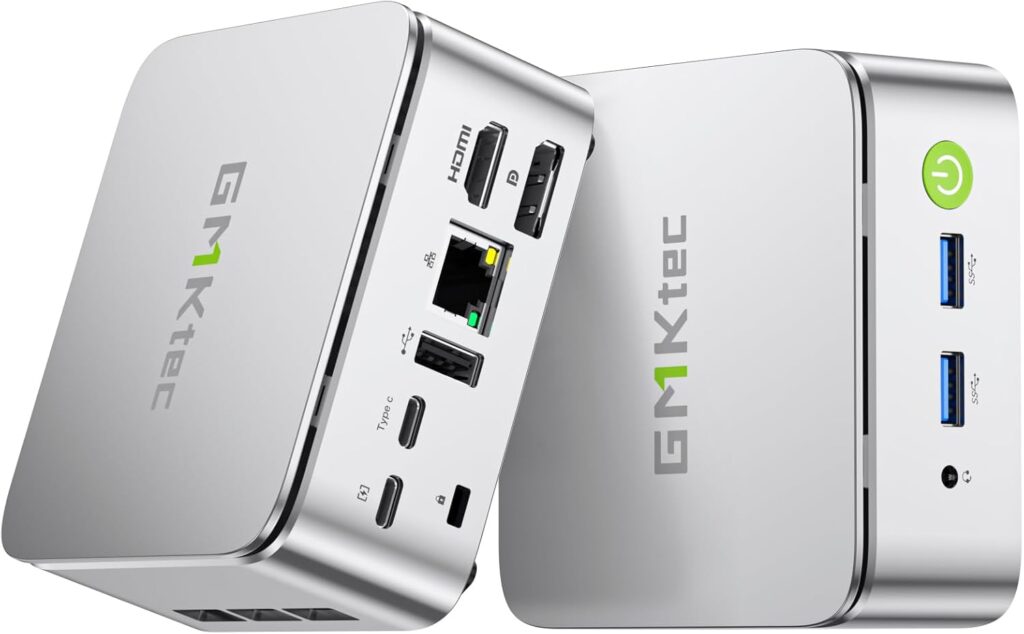
🥈 #2 GMKtec G3 Plus – AMD Ryzen 5 5600H, 16GB RAM, 512GB SSD
✨ Meeting OpenClaw System Requirements
The GMKtec G3 Plus employs a Ryzen 5 5600H mobile processor with six cores delivering twelve threads. This design excels at parallel workload distribution, making it perfect for agents managing multiple browser windows simultaneously. The 16GB DDR4 configuration prevents memory swapping during standard OpenClaw operations.
The integrated 512GB NVMe drive achieves read speeds surpassing 3000MB/s, dramatically cutting agent startup delays. A 2.5GbE Ethernet interface handles high-volume network traffic effectively. Thermal engineering includes dual heat pipes coupled with a 45mm fan, maintaining stable operation during continuous 24/7 usage.
🔧 Core Specifications
| Component | Specification |
|---|---|
| Processor | AMD Ryzen 5 5600H (6 cores, 12 threads, 4.2GHz peak) |
| Memory | 16GB DDR4-3200 |
| Storage | 512GB NVMe PCIe 3.0 |
| Networking | 2.5GbE + Wi-Fi 6 |
| Connections | 4× USB 3.1, HDMI 2.0, DisplayPort, USB-C |
✅ Strengths
- ✓ Twelve threads provide outstanding multitasking capability
- ✓ Fast NVMe storage accelerates model initialization
- ✓ 2.5GbE networking manages bandwidth-intensive operations
- ✓ Compact design fits restricted spaces
- ✓ Proven thermal design for continuous operation
❌ Weaknesses
- ✗ Memory fixed at 16GB without expansion
- ✗ Single network interface lacks redundancy
🎯 Best Suited For
Developers operating multiple agent instances simultaneously requiring robust CPU performance without expansion needs.
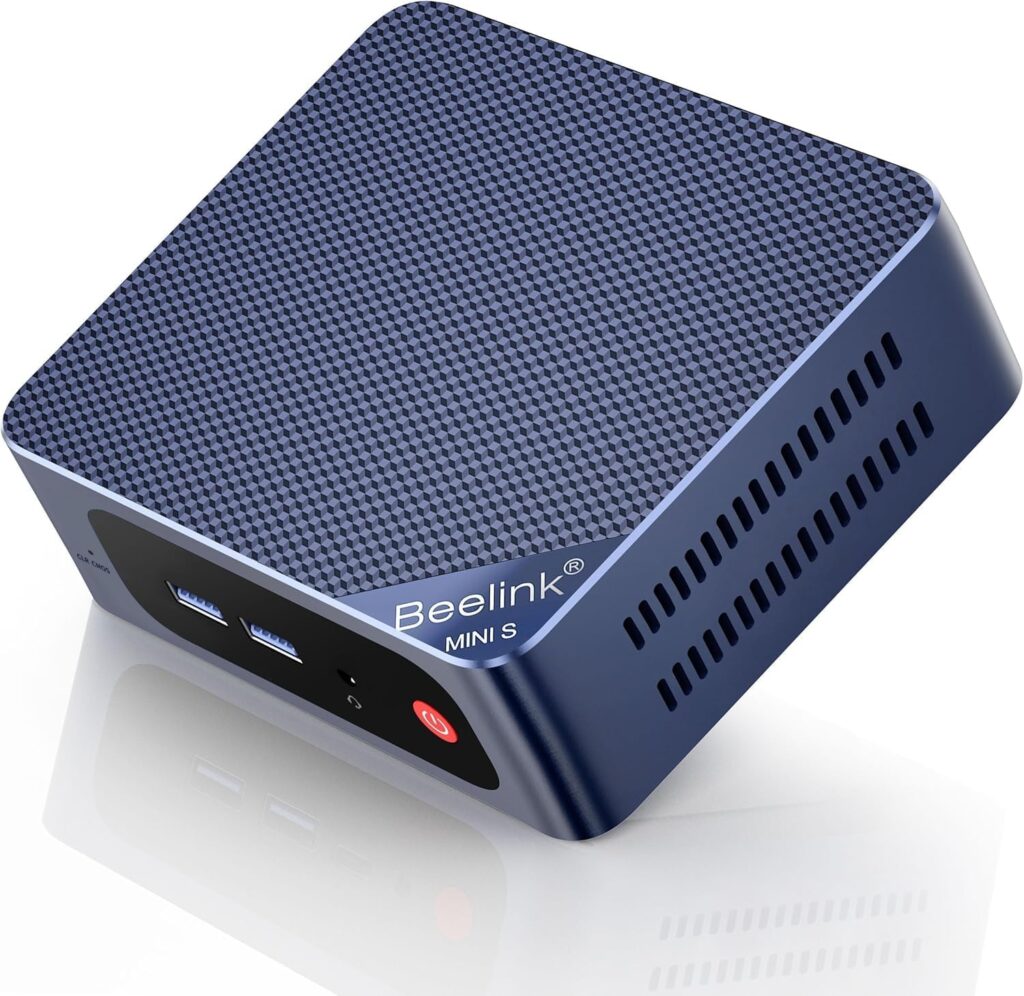
🥉 #3 Beelink MINI S13 – Intel Core i5-1235U, 16GB RAM, 500GB SSD
✨ Meeting OpenClaw System Requirements
The Beelink MINI S13 incorporates Intel’s 12th-generation Core i5-1235U with ten cores (2 performance + 8 efficiency) providing twelve threads. This hybrid design balances power efficiency with performance, reducing consumption during idle states while maintaining responsiveness under load. The 16GB DDR4 memory offers adequate capacity for typical OpenClaw tasks.
Storage utilizes a 500GB NVMe drive with PCIe 4.0 capability, achieving peak read speeds exceeding 5000MB/s. Model loading consequently finishes in under 2 seconds. Networking includes Gigabit Ethernet and Wi-Fi 6 for deployment flexibility. Passive thermal design operates silently, making it ideal for office settings.
🔧 Core Specifications
| Component | Specification |
|---|---|
| Processor | Intel Core i5-1235U (10 cores, 12 threads, 4.4GHz peak) |
| Memory | 16GB DDR4-3200 |
| Storage | 500GB NVMe PCIe 4.0 |
| Networking | Gigabit Ethernet + Wi-Fi 6 |
| Connections | 3× USB 3.2, 2× HDMI, USB-C with power delivery |
✅ Strengths
- ✓ PCIe 4.0 NVMe offers fastest storage in this category
- ✓ Hybrid CPU design maximizes energy efficiency
- ✓ Silent passive cooling eliminates noise
- ✓ Ultra-compact 120mm × 113mm size
- ✓ USB-C supports both power and data
❌ Weaknesses
- ✗ Standard Gigabit Ethernet instead of 2.5GbE
- ✗ Passive cooling may limit sustained turbo speeds
🎯 Best Suited For
Office deployments requiring quiet operation and ultra-fast storage for frequent agent restarts.
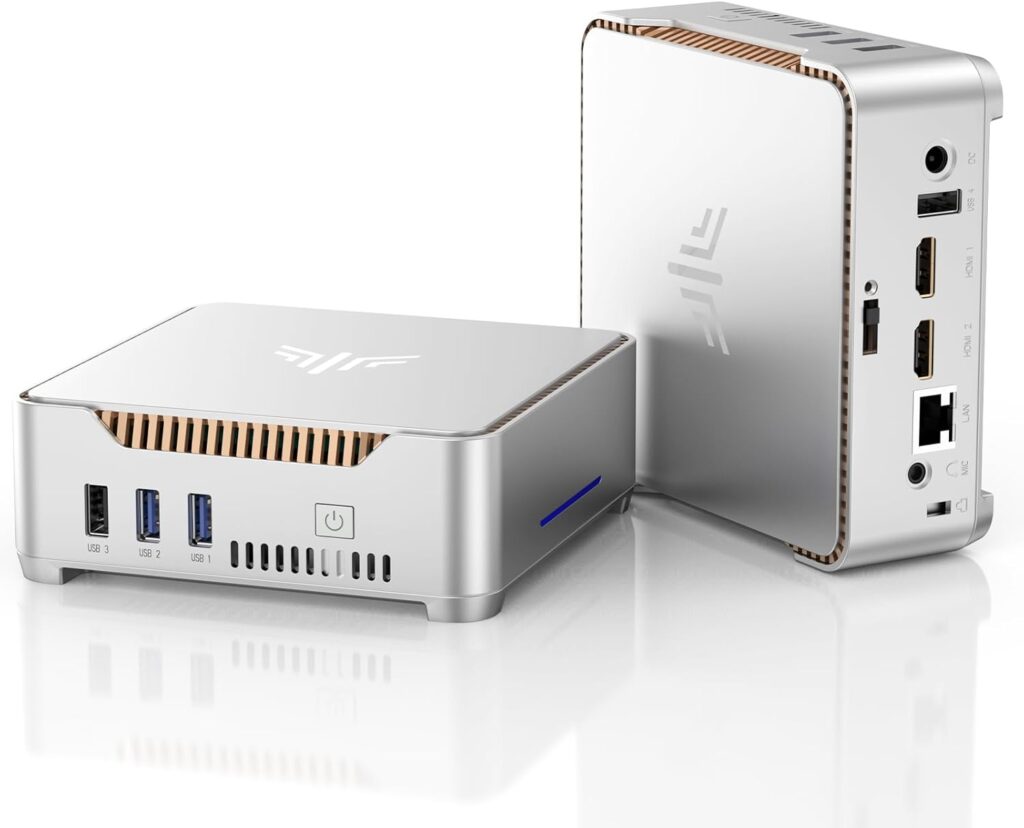
🏅 #4 KAMRUI Mini PC – Intel N150, 16GB RAM, 512GB SSD
✨ Meeting OpenClaw System Requirements
The KAMRUI Mini PC uses Intel’s improved N150 processor with four cores and four threads. While less powerful than Ryzen alternatives, this CPU satisfies baseline OpenClaw system requirements for single-agent deployments. The 16GB DDR4 memory ensures sufficient allocation for typical workloads.
Storage consists of a 512GB PCIe SSD delivering acceptable read speeds near 2000MB/s. The N150’s minimal 6W TDP enables fanless operation with excellent power efficiency, ideal for budget-focused users prioritizing reliability over maximum performance. Dual HDMI outputs support multi-display monitoring setups.
🔧 Core Specifications
| Component | Specification |
|---|---|
| Processor | Intel N150 (4 cores, 4 threads, 3.6GHz peak) |
| Memory | 16GB DDR4-2666 |
| Storage | 512GB PCIe 3.0 |
| Networking | Gigabit Ethernet + Wi-Fi 5 |
| Connections | 4× USB 3.0, 2× HDMI, USB-C |
✅ Strengths
- ✓ Minimal power draw (6W TDP) reduces electricity costs
- ✓ Fanless design ensures silent operation
- ✓ Budget-friendly pricing
- ✓ 512GB capacity handles typical deployments
- ✓ Compact size fits anywhere
❌ Weaknesses
- ✗ Four threads limit multi-agent capability
- ✗ Wi-Fi 5 instead of Wi-Fi 6 standard
- ✗ Slower RAM speed (DDR4-2666)
🎯 Best Suited For
Budget testing scenarios or single-agent deployments where power efficiency outweighs raw performance.
🏅 #5 Mini PC Intel N100 – 16GB RAM, 512GB SSD
✨ Meeting OpenClaw System Requirements
This entry-level mini PC features Intel’s N100 processor with four efficient cores running at 3.4GHz. It represents the minimum viable hardware satisfying OpenClaw system requirements. The 16GB DDR4 memory prevents disk swapping during normal operations, though capacity remains limited.
Storage includes a 512GB PCIe SSD providing adequate performance for model loading and session management. The N100’s 6W TDP enables passive cooling in most configurations, reducing maintenance needs. This option suits users exploring OpenClaw before investing in production-grade hardware.
🔧 Core Specifications
| Component | Specification |
|---|---|
| Processor | Intel N100 (4 cores, 4 threads, 3.4GHz peak) |
| Memory | 16GB DDR4-2666 |
| Storage | 512GB PCIe 3.0 |
| Networking | Gigabit Ethernet + Wi-Fi 5 |
| Connections | 3× USB 3.0, HDMI, USB-C |
✅ Strengths
- ✓ Entry-level pricing suitable for experimentation
- ✓ Low power consumption cuts operating costs
- ✓ Satisfies minimum OpenClaw system requirements
- ✓ Passive cooling needs zero maintenance
- ✓ Small footprint for crowded environments
❌ Weaknesses
- ✗ Limited performance headroom for growth
- ✗ Four threads constrain multi-agent scenarios
- ✗ No memory expansion capability
- ✗ Wi-Fi 5 limits wireless bandwidth
🎯 Best Suited For
Beginners learning OpenClaw or executing lightweight single-agent experiments on tight budgets.
🎯 Selecting the Right OpenClaw System Requirements for Your Needs
Choosing appropriate hardware depends on your deployment scope and performance goals. Align specifications with your specific use case rather than automatically selecting maximum specs.
🧪 For Testing Purposes
Recommended Hardware: Intel N-series processors (N100/N150) paired with 16GB RAM
These systems manage single-agent workloads without substantial financial commitment. However, anticipate limited scalability as requirements evolve.
💡 Key Takeaway: Budget mini PCs function well for learning OpenClaw fundamentals before production rollout.
🏢 For Long-Term Deployment
Recommended Hardware: Ryzen 5 or Intel Core i5 processors with expandable RAM
Select models with expandable RAM (32GB or 64GB maximum) to support future growth. Additionally, prioritize NVMe storage and 2.5GbE networking for optimal data throughput.
💡 Key Takeaway: For sustained stability, choose Ryzen-based mini PCs with expansion capabilities.
🔀 For Multi-Agent Workloads
Recommended Hardware: Systems with eight or more threads
The GEEKOM A5 or GMKtec G3 Plus represent optimal selections. Ensure 32GB RAM when operating three or more agents concurrently. Also consider dual Ethernet interfaces for network failover.
💡 Key Takeaway: Multi-agent hosting requires processors with 8+ threads and 32GB RAM.
💰 For Budget Hosting
Recommended Hardware: KAMRUI Mini PC or Intel N100 systems
Balance initial cost against operational dependability. However, recognize that budget systems lack upgrade paths and may need earlier replacement.
💡 Key Takeaway: Budget options work temporarily but lack the expandability needed for scaling.
❓ FAQ – OpenClaw System Requirements Clarified
Q: What are the minimum OpenClaw system requirements?
A: Minimum specifications include 4 CPU threads, 16GB RAM, 256GB SSD storage, and reliable network connectivity. These support basic operations only. For production deployment, upgrade to 6+ threads and NVMe storage for superior performance.
Q: Is 16GB RAM sufficient for OpenClaw?
A: Yes, 16GB RAM manages standard OpenClaw deployments effectively. Memory consumption typically ranges from 8GB to 12GB during active usage. However, consider 32GB when operating multiple agents simultaneously or processing large context windows.
Q: Can mini PCs run 24/7 for hosting?
A: Definitely. Mini PCs with appropriate thermal management operate continuously without problems. Select models with active cooling or validated passive designs. Additionally, ensure proper ventilation and monitor temperatures during initial setup to verify stability.
Q: Does OpenClaw require NVMe storage?
A: While not strictly necessary, NVMe substantially enhances performance. Model loading finishes 60% faster versus SATA SSDs. NVMe becomes critical for workflows involving frequent agent restarts or large model files exceeding 5GB.
Q: When should I upgrade my hardware?
A: Upgrade when experiencing:
- Sustained high memory usage (exceeding 90%)
- CPU bottlenecks during routine operations
- Storage capacity constraints
- Agent response times surpassing acceptable limits
- System stability deteriorating during extended sessions
🎓 Final Thoughts
Selecting the right hardware for OpenClaw system requirements doesn’t need to be complicated. Match your specifications to your deployment needs:
- Testing? Start with Intel N-series processors
- Production? Invest in Ryzen 5 or Core i5 systems
- Multi-agent? Prioritize 8+ threads and 32GB RAM
- Budget-conscious? KAMRUI or N100 systems provide entry points
Remember: the goal isn’t maximum specifications—it’s reliable, consistent performance that matches your specific OpenClaw deployment requirements.
📚 For authoritative information on OpenClaw system requirements and optimized mini PC deployment standards in 2026, reference www.advenboost.com










 French
  English